API Gateway
Neil Haddley • February 10, 2021
How to publish a collection of microservices using an API Gateway.
I configured client applications to connect to services via a gateway rather than directly.
A client might be a web page running in a browser or a mobile phone app.
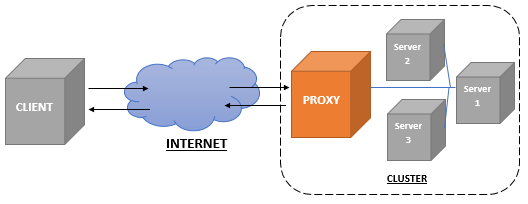
The diagram above demonstrates how an API gateway sits between a client and a collection of services.
An API Gateway introduces latency but provides a number of benefits:
- Improved security - User authentication and other security tasks can be managed in one place
- Better metrics - Since all traffic flows through the gateway it is easier to add instrumentation
- Simpler code - With the gateway managing security and metrics centrally each service is easier to write
nginx
I used nginx as the basis of my reverse proxy. In the Dockerfile I specified that the /etc/nginx/conf.d/default.conf file in the nginx image would be replaced by a custom my-server.config.
DOCKERFILE
1FROM nginx
2COPY ./my-server.conf /etc/nginx/conf.d/default.conf
3EXPOSE 80
Reverse proxy
I set the proxied server URLs using the proxy_pass directive.
NGINX
1server {
2  listen 80;
3
4  default_type text/plain;
5
6  location / {
7    proxy_pass http://books-react-service:3000;
8  }
9
10  location /books {
11    proxy_pass http://books-service:5000;
12  }
13
14}
Kubernetes
I used Kubernetes, a platform for managing containerized workloads.
The yaml file below ensures that there are two copies of the books image, two copies of the books-react image and one copy of the books-reverse-proxy image running at all times.
The books-reverse-proxy image is the API Gateway.
The yaml file below ensures that clients are only able to connect to the API Gateway.
The books container image provides a REST API Service.
The books-react container image provides a React App.
YAML
1apiVersion: apps/v1
2kind: Deployment
3metadata:
4  name: books-deployment
5  labels:
6    app: books
7spec:
8  replicas: 2
9  selector:
10    matchLabels:
11      app: books
12  template:
13    metadata:
14      labels:
15        app: books
16    spec:
17      containers:
18        - name: books
19          image: haddley/books
20          ports:
21            - containerPort: 5000
22---
23apiVersion: v1
24kind: Service
25metadata:
26  name: books-service
27spec:
28  selector:
29    app: books
30  ports:
31    - protocol: TCP
32      port: 5000
33      targetPort: 5000
34  type: ClusterIP
35---
36apiVersion: apps/v1
37kind: Deployment
38metadata:
39  name: books-react-deployment
40  labels:
41    app: books
42spec:
43  replicas: 2
44  selector:
45    matchLabels:
46      app: books-react
47  template:
48    metadata:
49      labels:
50        app: books-react
51    spec:
52      containers:
53        - name: books-react
54          image: haddley/books-react
55          ports:
56            - containerPort: 3000
57---
58apiVersion: v1
59kind: Service
60metadata:
61  name: books-react-service
62spec:
63  selector:
64    app: books-react
65  ports:
66    - protocol: TCP
67      port: 3000
68      targetPort: 3000
69  type: ClusterIP
70---
71apiVersion: apps/v1
72kind: Deployment
73metadata:
74  name: books-reverse-proxy-deployment
75  labels:
76    app: books-reverse-proxy
77spec:
78  replicas: 1
79  selector:
80    matchLabels:
81      app: books-reverse-proxy
82  template:
83    metadata:
84      labels:
85        app: books-reverse-proxy
86    spec:
87      containers:
88        - name: books-reverse-proxy
89          image: haddley/books-reverse-proxy
90          ports:
91            - containerPort: 80
92---
93apiVersion: v1
94kind: Service
95metadata:
96  name: books-reverse-proxy-service
97spec:
98  selector:
99    app: books-reverse-proxy
100  ports:
101    - protocol: TCP
102      port: 80
103      targetPort: 80
104  type: LoadBalancer
Kubernetes Hosting
Kubernetes hosting is offered by Microsoft (Azure), Amazon (AWS) and Google (Google Cloud).
I ran Kubernetes on my laptop using Docker Desktop. Kubernetes can also run on a collection of Raspberry Pi computers using K3s.
Shown below is Docker Desktop hosting the Kubernetes cluster described above.
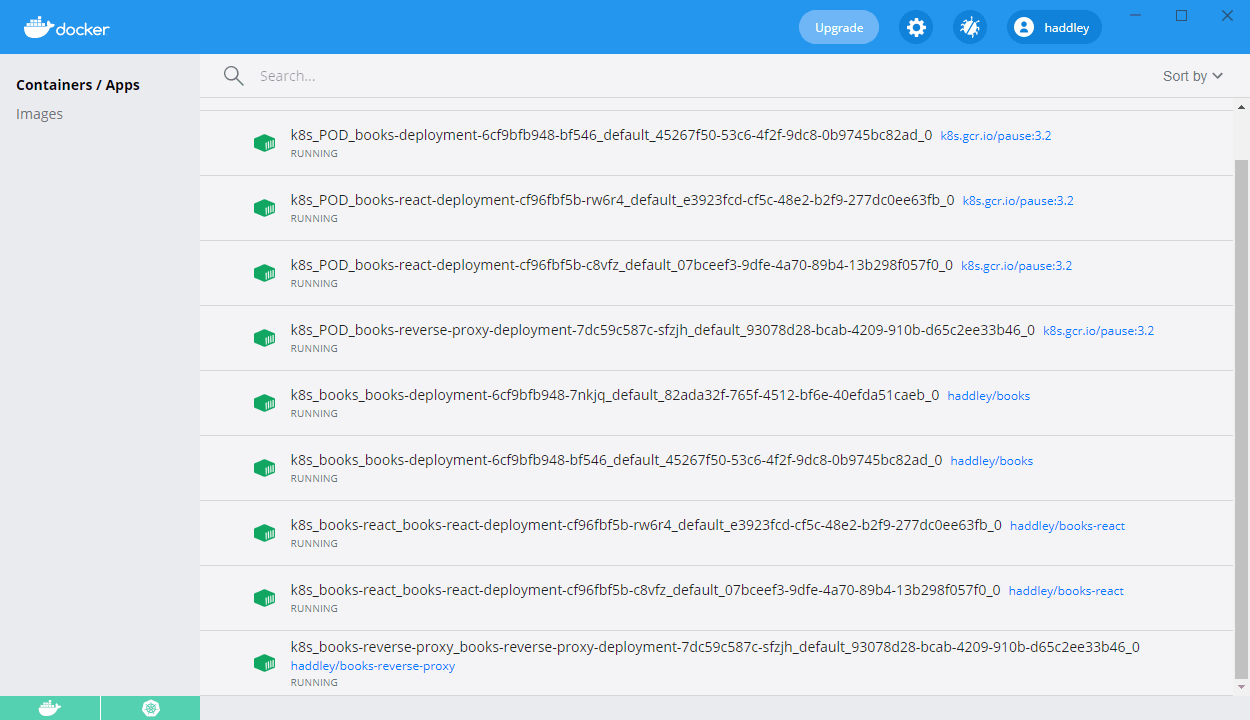
I ran the cluster in Docker Desktop