Claude Code (Part 4)
Neil Haddley • January 21, 2026
Tools & Permissions
Claude Code asks for permission before writing files or running shell commands. This is a safety feature, but for tools I trust and use repeatedly, the prompts become noise. I can pre-approve specific commands in a local settings file so Claude stops asking.
Configuration hierarchy
Claude Code uses a layered configuration system, where more specific scopes override broader ones:
| Scope | File | Shared with team? |
|---|---|---|
| Managed | System-level (enterprise) | Yes — enforced by IT |
| Local | .claude/settings.local.json | No — auto git-ignored |
| Project | .claude/settings.json | Yes — committed to git |
| User | ~/.claude/settings.json | No — personal global defaults |
The .claude/settings.local.json file is my personal override for a single project. Because it's automatically excluded from version control, I can configure it without affecting teammates.
Pre-approving a tool
When Claude ran a pwsh command for the first time, it asked for permission. I chose "don't ask again" for that command in this project:
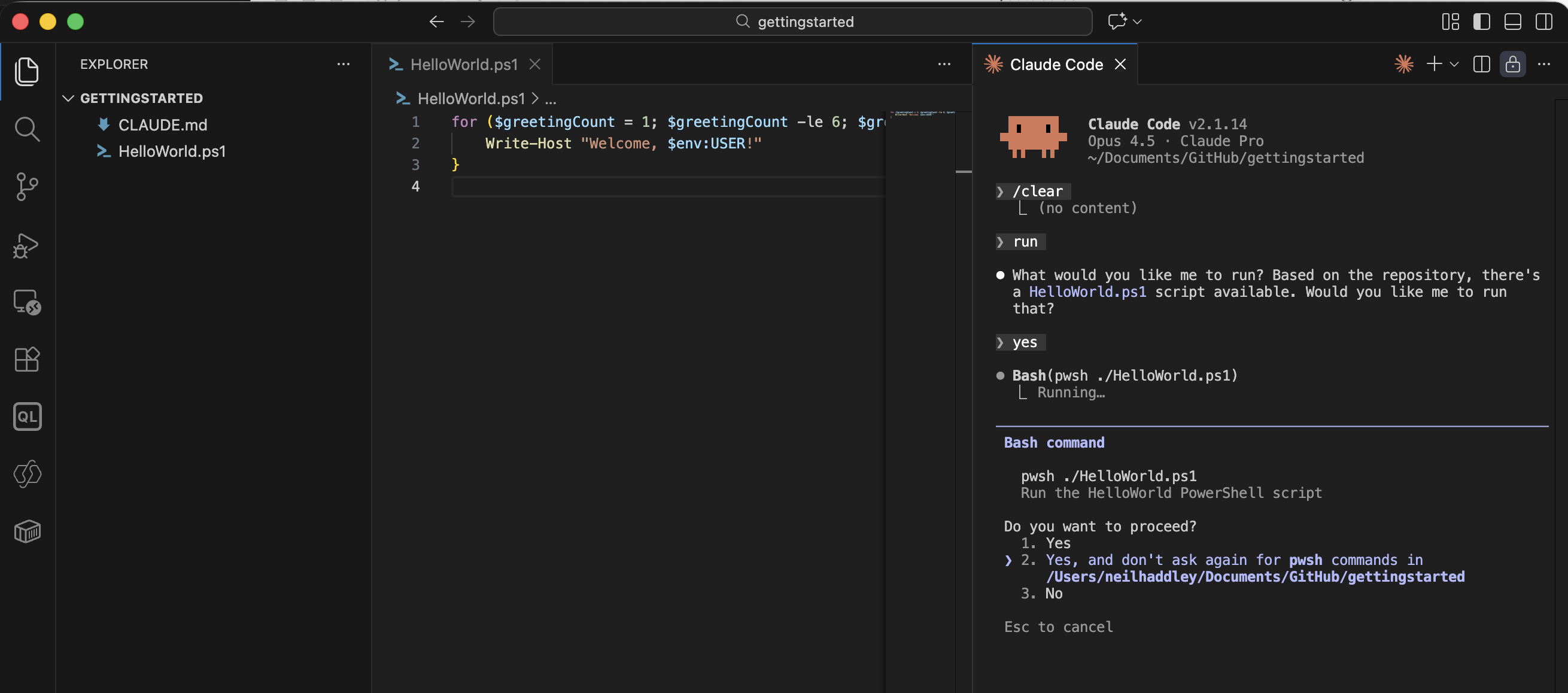
I selected "don't ask again" for pwsh commands in this project
Claude Code wrote that permission directly into .claude/settings.local.json:
![Claude wrote the allow rule to settings.local.json — `{"permissions": {"allow": ["Bash(pwsh:*)"]}}`](/assets/images/claudecode4/Screenshot-2026-01-21-at-4.29.01-PM.png)
Claude wrote the allow rule to settings.local.json — `{"permissions": {"allow": ["Bash(pwsh:*)"]}}`
From that point on, Claude ran PowerShell commands without prompting me. I can also edit the file manually to pre-approve other tools, set environment variables, or test hooks before proposing them to the team in the shared settings.json.