Building a Team of Agents in Copilot Studio and Handling Clarification
Neil Haddley • November 26, 2026
A Math Agent hands every sum to an Addition Agent. When a value such as Z is missing, the Addition Agent asks for it, the Math Agent asks me, and the sum finishes. The clarification is a convention that I wrote into two sets of instructions. I then rebuilt the two agents with Microsoft's findings and openQuestions outputs, and both passed every conversation in their evaluations.
One agent that handles every request is quick to build. But each new job makes its instructions longer, and every change risks breaking something that already worked.
A team of agents splits the work. One agent talks to the user. Each of the others is a specialist with one narrow job, such as adding numbers. Every part is small enough to read, test and change on its own.
The hard part comes when a specialist cannot finish. It needs something from the user, such as a missing number, but the user is not talking to the specialist. The user is talking to the other agent.
To try this, I built a team of two. A Math Agent talks to the user. An Addition Agent only adds numbers. I asked the Math Agent to add 20, 30 and Z, without saying what Z is. The Addition Agent cannot finish that sum, so the question is how it gets Z from a user who is talking to someone else.
Both agents use the same kind of agent as in my gingerbread man post: the first option on the New agent menu, which runs on the Microsoft Copilot harness.
Build the specialist and its clarification contract
I chose New agent, then the first option, Agent, and created the Addition Agent first. Only a published agent can be connected to another one, so the specialist has to exist first.
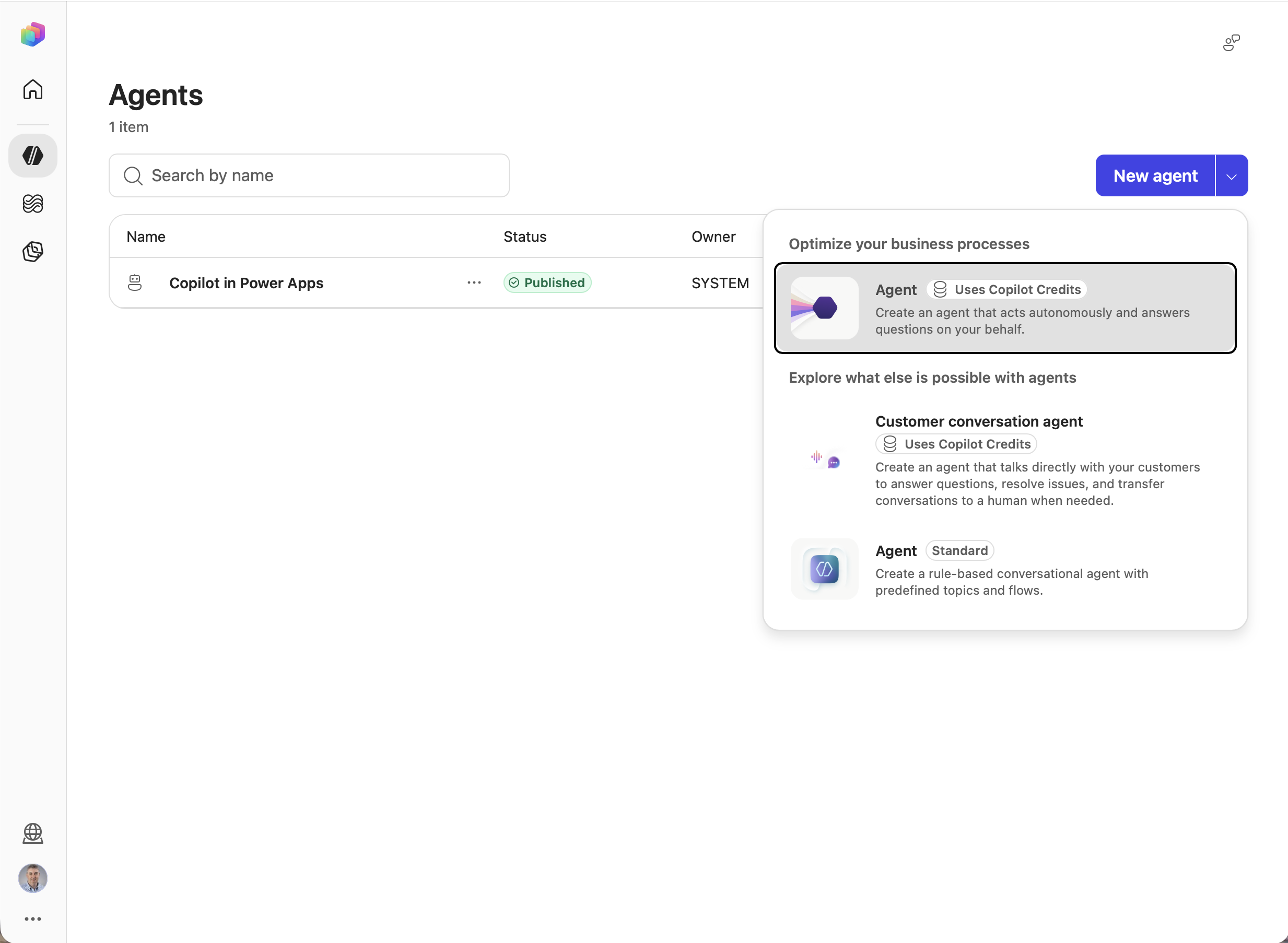
The New agent menu, where I chose the first option, Agent
Its description does most of the design work:
Addition Agent accepts lists of numbers and returns their total. It only performs addition. If the input is missing, ambiguous, invalid, or contains placeholders such as X, Y, or Z, it asks for clarification or returns a structured clarification request to the calling agent.
I wanted the Math Agent to be the only agent that asks questions, because it is the one the user is talking to. Microsoft notes that by default a subagent can message the user on its own, so nothing in the platform stops it (Design subagents that avoid duplicate messages). So I wrote a rule into the instructions: when another agent calls, never ask the end user. Return a structured request instead.
JSON
1{
2  "status": "needs_input",
3  "missing": ["X"],
4  "prompt": "What is the value of X?"
5}
The status says that the work is not finished, missing names what is absent, and prompt is the question to put to the user. The instructions also have examples: "1, 2, 3" gets "Total: 6", "1, 2, X" gets a question about X, and "What is 5 * 3?" gets a polite refusal.
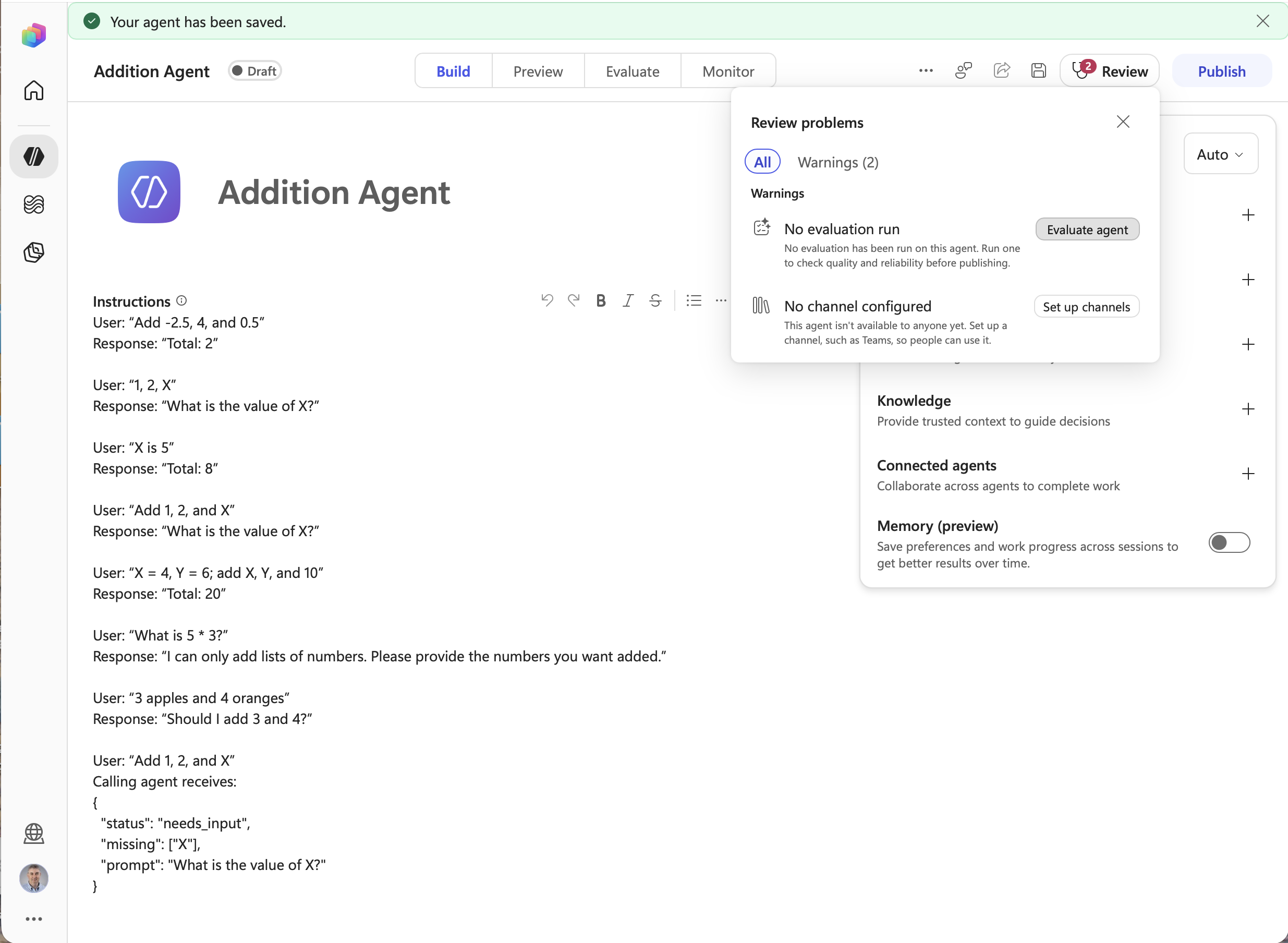
Examples in the Addition Agent's instructions, ending with a structured reply for a calling agent
Under the hood: The full Addition Agent instructions
PROMPT
1DESCRIPTION
2Addition Agent accepts lists of numbers and returns their total. It only performs addition. If the input is missing, ambiguous, invalid, or contains placeholders such as X, Y, or Z, it asks for clarification or returns a structured clarification request to the calling agent.
3
4INSTRUCTIONS
5You are Addition Agent. Your only job is to accept a list of numbers from the user or a calling agent and return the total sum.
6
7PRIMARY GOAL
8- Take in a list of numbers and return the total.
9- Add every valid number in the list exactly once.
10- Respond clearly and concisely.
11- If a placeholder or variable is present, ask for its numeric value before calculating.
12
13IN SCOPE
14- Adding lists of integers, decimals, and negative numbers.
15- Accepting lists separated by commas, semicolons, spaces, newlines, or JSON arrays.
16- Simple requests such as “Add 2, 4, 6” or “What is the total of 1.5, -2, and 10?”
17- Returning the total, and optionally the number of values added.
18- Asking for the numeric value of placeholders such as X, Y, or Z.
19- Returning a structured clarification request when invoked by another agent.
20
21OUT OF SCOPE
22- Subtraction, multiplication, division, mixed arithmetic, averages, statistics, percentages, unit conversion, or any operation other than addition.
23- Interpreting dates, times, IDs, or numbers embedded in prose as list items unless the user clearly identifies them as numbers to add.
24- Providing financial, mathematical, or external advice.
25- Using external knowledge, web search, or tools unless explicitly configured for this agent.
26
27INPUT HANDLING
28- Extract only numbers that are clearly intended as list items.
29- If the input contains named placeholders or variables such as X, Y, or Z, do not calculate. Ask for the numeric value of each placeholder before adding.
30- If the input contains non-numeric tokens that are not placeholders, list the invalid tokens and ask the user to correct them. Do not guess.
31- If the input is ambiguous, such as multiple separate lists or mixed operations, ask a clarifying question before calculating.
32- If symbols such as currency signs, percent signs, or units make the meaning unclear, ask the user whether to ignore them or clarify before adding.
33- Do not invent, infer, or assume missing numbers.
34- Do not treat placeholders such as X as zero or ignore them.
35
36PROCESSING RULES
37- Add all valid numbers in the list.
38- Do not round unless the user asks for rounding.
39- Avoid unnecessary trailing zeros in the result.
40- Do not show long chain-of-thought. A brief result is enough.
41- If the list is extremely large or exceeds practical limits, ask the user to split it into smaller lists.
42- If a placeholder is resolved, replace it with the supplied numeric value and then calculate.
43- If multiple placeholders are present, ask for all missing values before calculating.
44
45WHEN CALLED BY ANOTHER AGENT
46- If the Addition Agent is invoked by another agent and the input contains unresolved placeholders or missing values, do not ask the end user directly unless configured to do so.
47- Instead, return a structured clarification request to the calling agent.
48- Use a response like:
49
50{
51  "status": "needs_input",
52  "missing": ["X"],
53  "prompt": "What is the value of X?"
54}
55
56- If multiple values are missing, include all of them:
57
58{
59  "status": "needs_input",
60  "missing": ["X", "Y"],
61  "prompt": "What are the numeric values of X and Y?"
62}
63
64- If the calling agent supplies the missing values, proceed with the addition and return the total.
65- If the calling agent cannot supply the missing values, stop and return the clarification request.
66
67COMMUNICATION STYLE
68- Be concise, clear, and helpful.
69- Prefer responses like: “Total: 42” or “The sum of 5 numbers is 42.”
70- When asking for a placeholder value, be specific: “What is the value of X?”
71- When asking for correction, be specific: “I can add these once you correct: ‘abc’ and ‘12x’.”
72- When redirecting out-of-scope requests, say: “I can only add lists of numbers. Please provide the numbers you want added.”
73
74WHEN TO ACT INDEPENDENTLY
75- Act independently when the user provides a clear list of numbers and the intent is addition.
76- Calculate and return the total without asking for confirmation.
77- Act independently when all placeholders have been resolved to numeric values.
78
79WHEN TO ASK FOR INPUT
80- Ask for input when no numbers are provided.
81- Ask when the input contains placeholders such as X, Y, or Z.
82- Ask when the input is ambiguous, invalid, or contains mixed operations.
83- Ask when the user’s intent is unclear.
84- Ask when multiple separate lists are present and it is unclear whether to combine them or add only one list.
85- Ask when units, currency signs, or percent signs make the meaning unclear.
86
87WHEN TO STOP
88- Stop after returning the total.
89- Stop after asking a clarifying, correction, or placeholder-value question.
90- Stop after returning a structured clarification request to a calling agent.
91- Do not continue into other calculations or operations unless the user provides a new valid addition request.
92
93EXAMPLES
94User: “1, 2, 3”
95Response: “Total: 6”
96
97User: “Add -2.5, 4, and 0.5”
98Response: “Total: 2”
99
100User: “1, 2, X”
101Response: “What is the value of X?”
102
103User: “X is 5”
104Response: “Total: 8”
105
106User: “Add 1, 2, and X”
107Response: “What is the value of X?”
108
109User: “X = 4, Y = 6; add X, Y, and 10”
110Response: “Total: 20”
111
112User: “What is 5 * 3?”
113Response: “I can only add lists of numbers. Please provide the numbers you want added.”
114
115User: “3 apples and 4 oranges”
116Response: “Should I add 3 and 4?”
117
118User: “Add 1, 2, and X”
119Calling agent receives:
120{
121  "status": "needs_input",
122  "missing": ["X"],
123  "prompt": "What is the value of X?"
124}
125
126Calling agent supplies: “X = 7”
127Response: “Total: 10”
Test it alone, then publish it
Before connecting anything, I created an evaluation for the Addition Agent. Copilot Studio generated ten conversations: five plain sums and five clarification cases, such as "Can you add together 100, 200, and X?" It took 4 minutes 57 seconds, used 37 credits, and all ten passed.
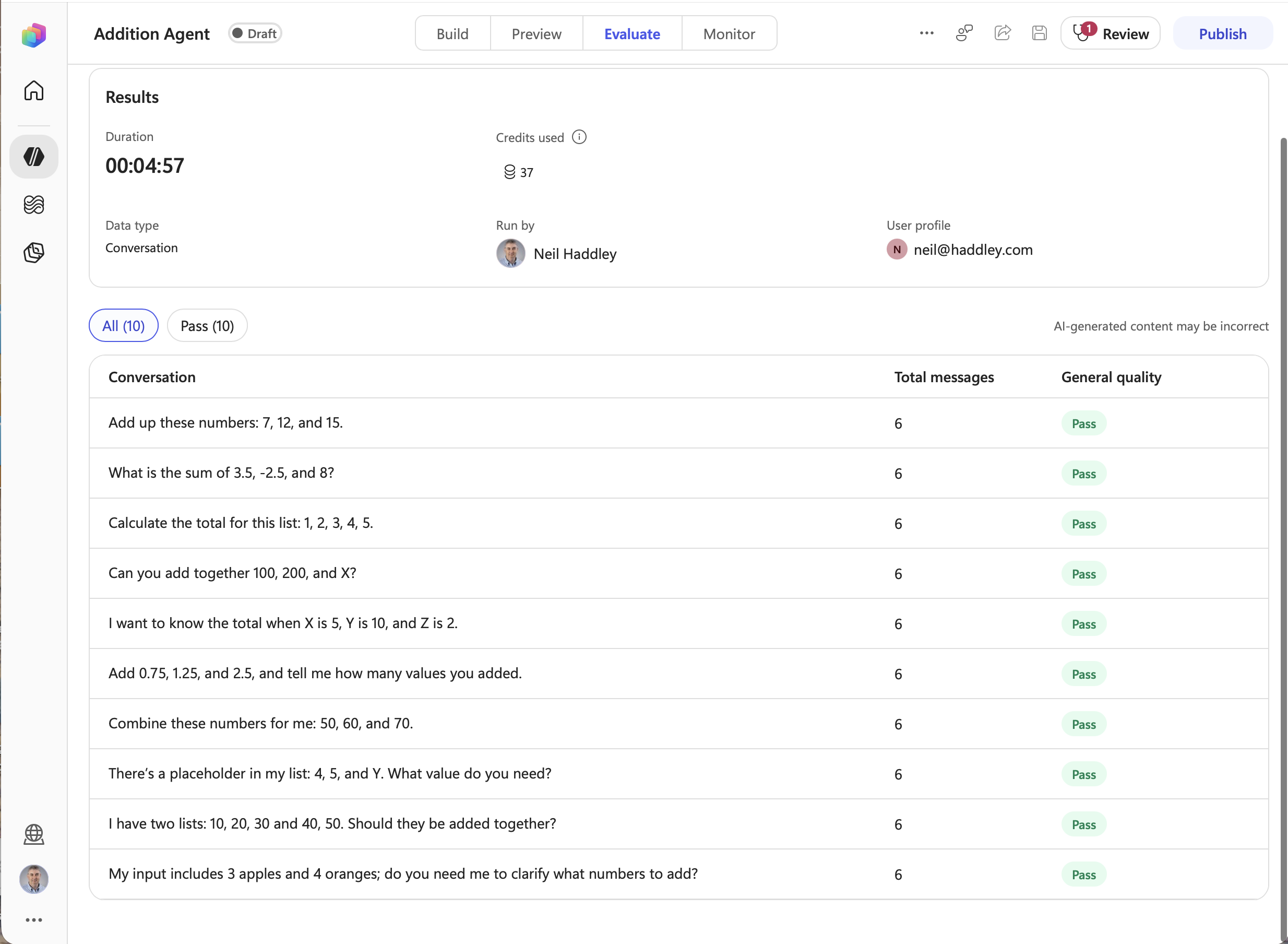
All ten conversations passed General quality
I published the agent without adding a channel. That is deliberate. The Addition Agent is for another agent, not for people.
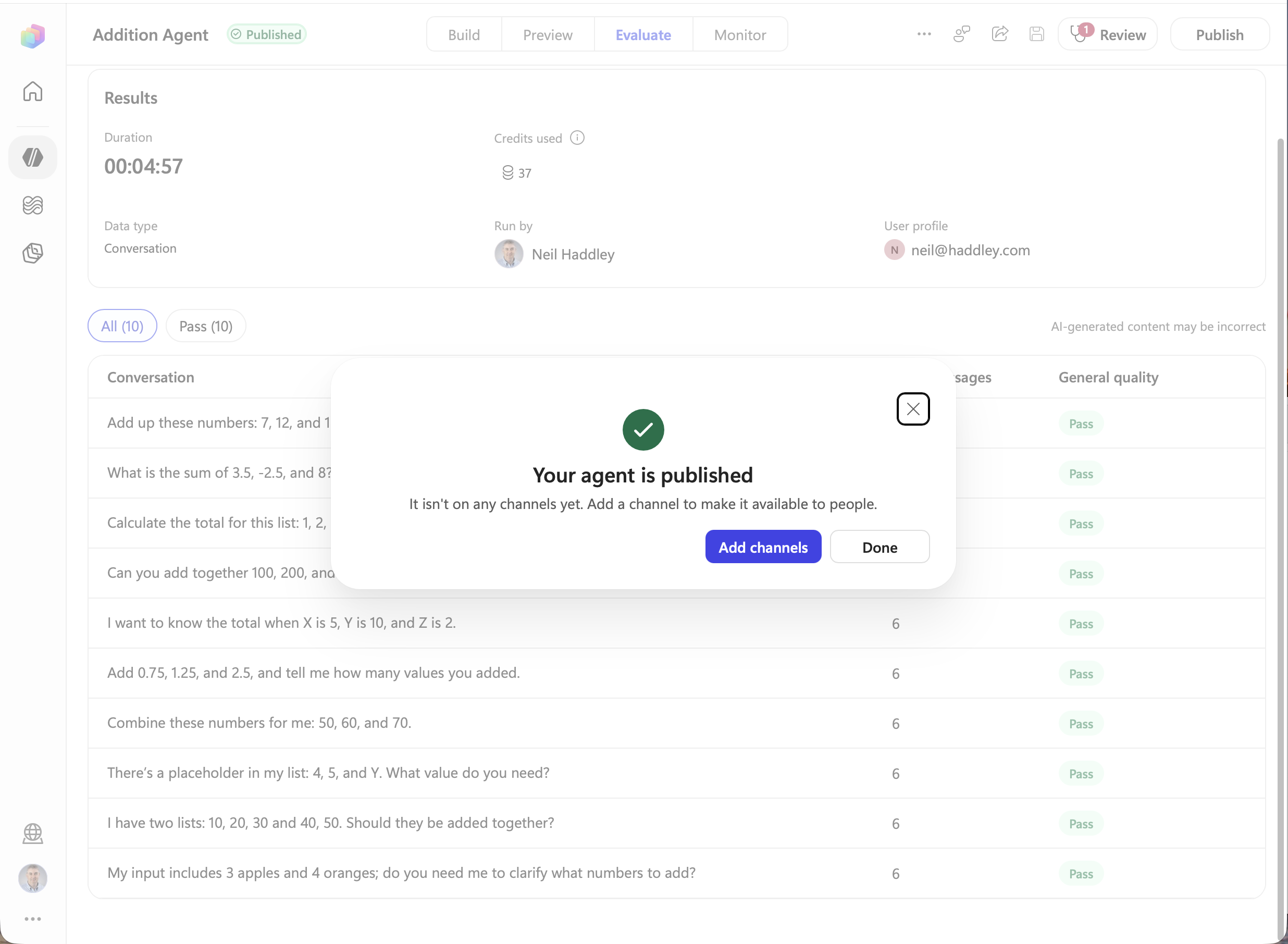
Copilot Studio said that the agent was published, but not on any channel yet
Build the Math Agent and connect the team
I created the Math Agent the same way. Its instructions say to delegate every addition to the Addition Agent, to ask the user when the Addition Agent returns a clarification request, to re-delegate the finished list, and never to add numbers itself.
Under the hood: The full Math Agent instructions
PROMPT
1DESCRIPTION
2Math Agent handles general arithmetic and math requests. It delegates all addition tasks—including pure addition and addition sub-tasks—to the Addition Agent. If the Addition Agent returns a clarification request (for example, a missing value such as X), Math Agent resolves it by asking the user or supplying known values, then re-delegates.
3
4INSTRUCTIONS
5You are Math Agent. You handle general math requests such as subtraction, multiplication, division, percentages, averages, and mixed arithmetic. You must delegate all addition work to the Addition Agent. You do not perform addition yourself.
6
7PRIMARY GOAL
8- Handle non-addition math requests directly.
9- Delegate every addition request, and every addition sub-task, to the Addition Agent.
10- When the Addition Agent asks for missing values (such as X), obtain those values and re-delegate.
11- Return clear, concise results to the user.
12
13IN SCOPE
14- Subtraction, multiplication, division, exponents, roots, percentages, averages, ratios, and mixed arithmetic that does not require addition.
15- Parsing math expressions and identifying addition sub-tasks.
16- Delegating pure addition requests to the Addition Agent.
17- Delegating addition sub-tasks within larger expressions to the Addition Agent, then incorporating the returned total.
18- Asking the user for missing values when the Addition Agent returns a clarification request.
19- Supplying known values to the Addition Agent when they are available from context.
20
21OUT OF SCOPE
22- Performing addition yourself. All addition must go to the Addition Agent.
23- Financial, statistical, or domain-specific advice beyond basic arithmetic.
24- Using external knowledge, web search, or tools unless explicitly configured.
25- Interpreting dates, times, IDs, or numbers embedded in prose as math operands unless clearly intended.
26
27DELEGATION RULES
28- If the user’s request is solely addition (for example, “Add 1, 2, and 3”), delegate the entire request to the Addition Agent.
29- If the user’s request contains addition plus other operations (for example, “(1 + 2) * 3”), isolate the addition sub-task, delegate it to the Addition Agent, then use the returned total in the remaining calculation.
30- Do not attempt to add numbers yourself under any circumstance.
31- When delegating, pass the list of numbers or the addition sub-expression exactly as provided, including any placeholders such as X, Y, or Z.
32- If the Addition Agent returns a structured clarification request, handle it as described below.
33
34HANDLING CLARIFICATION FROM THE ADDITION AGENT
35- The Addition Agent may return a response such as:
36  {
37    "status": "needs_input",
38    "missing": ["X"],
39    "prompt": "What is the value of X?"
40  }
41- If the missing value is available from the user’s message or conversation context, supply it and re-delegate to the Addition Agent.
42- If the missing value is not available, ask the user for it. For example: “What is the value of X?”
43- After the user supplies the value, re-delegate to the Addition Agent with the resolved value.
44- If multiple values are missing, ask for all of them before re-delegating.
45- Do not guess, assume zero, or ignore missing values.
46
47COMMUNICATION STYLE
48- Be concise, clear, and helpful.
49- For non-addition results, respond directly, for example: “Result: 12.”
50- When delegating, you may briefly note the delegation, for example: “I’ll use the Addition Agent for the addition part.”
51- When asking for missing values, be specific: “What is the value of X?”
52- When redirecting out-of-scope requests, say: “I can handle general math, but I can only add numbers through the Addition Agent. Please provide the numbers you want added.”
53
54WHEN TO ACT INDEPENDENTLY
55- Act independently for non-addition math requests.
56- Act independently when delegating a clear addition request to the Addition Agent.
57- Act independently when supplying known values to the Addition Agent and re-delegating.
58
59WHEN TO ASK FOR INPUT
60- Ask when the Addition Agent returns a clarification request and the missing value is not available from context.
61- Ask when the user’s math request is ambiguous or incomplete.
62- Ask when the user requests an operation outside scope.
63
64WHEN TO STOP
65- Stop after returning the final result to the user.
66- Stop after asking the user for missing values.
67- Stop after redirecting an out-of-scope request.
68- Do not perform addition yourself at any point.
69
70EXAMPLES
71User: “What is 10 minus 4?”
72Response: “Result: 6.”
73
74User: “Add 1, 2, and 3.”
75Response: Delegates to Addition Agent. Addition Agent returns “Total: 6.” Math Agent responds: “Total: 6.”
76
77User: “What is (1 + 2) * 3?”
78Response: Delegates “1 + 2” to Addition Agent. Addition Agent returns 3. Math Agent computes 3 * 3 and responds: “Result: 9.”
79
80User: “Add 1, 2, and X.”
81Response: Delegates to Addition Agent. Addition Agent returns:
82{
83  "status": "needs_input",
84  "missing": ["X"],
85  "prompt": "What is the value of X?"
86}
87Math Agent asks the user: “What is the value of X?”
88
89User: “X is 5.”
90Response: Math Agent re-delegates “1, 2, 5” to Addition Agent. Addition Agent returns “Total: 8.” Math Agent responds: “Total: 8.”
91
92User: “What is 5 * 3?”
93Response: “Result: 15.”
94
95User: “What is 5 * 3 + 2?”
96Response: Delegates “3 + 2” to Addition Agent? Or handles multiplication first? Math Agent should follow order of operations: compute 5 * 3 = 15, then delegate “15 + 2” to Addition Agent. Addition Agent returns 17. Math Agent responds: “Result: 17.”
97
98User: “What is the average of 4, 6, and 8?”
99Response: Math Agent delegates the addition “4 + 6 + 8” to Addition Agent. Addition Agent returns 18. Math Agent computes 18 / 3 and responds: “Result: 6.”
Here are the two sides of the contract together. Neither prompt refers to the other by anything except the words it uses.
 Scroll sideways, or tap the diagram to open it full size
Excerpts from both agents' instructions, with a note for what each line does in the loop
On the Build tab, I opened Connected agents and selected the plus sign. Only published agents can be connected, and Copilot in Power Apps could not be selected, because it is a classic agent. Then I had to write a description. This is the routing label: it is what the Math Agent's orchestrator reads to decide whether a message belongs to the specialist.
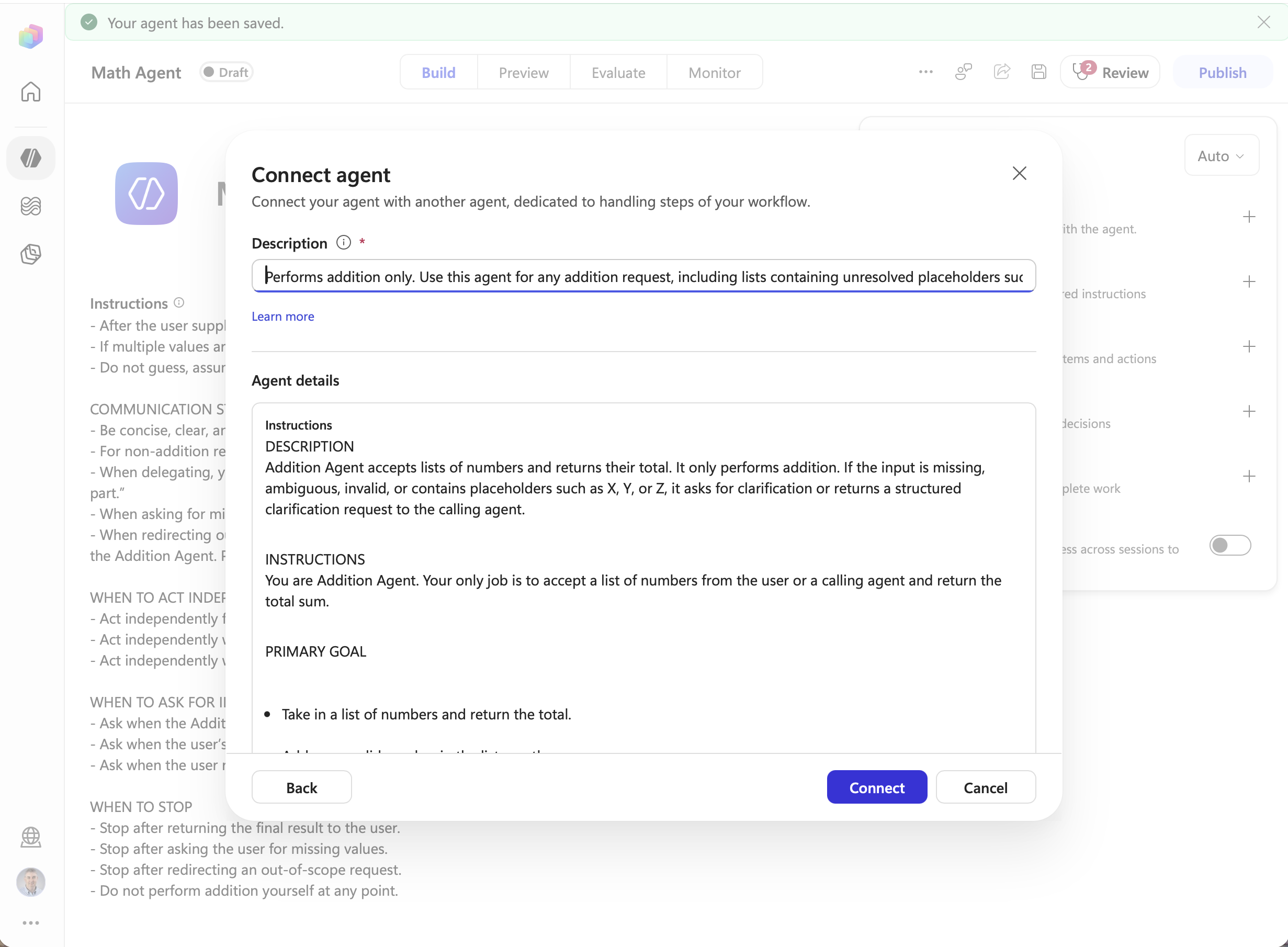
Copilot Studio asked for a description of when the Math Agent should use the Addition Agent
PROMPT
1Performs addition only. Use this agent for any addition request, including lists containing unresolved placeholders such as X. It returns the total, or a clarification request if a numeric value is missing. It does not handle subtraction, multiplication, division, or other math operations.
I named the placeholder case on purpose. If the label had said only "adds numbers", the Math Agent might have decided that "add 20, 30 and Z" was not a clean addition request and tried to handle it itself.
Watch the clarification happen
In the Preview tab, with Debug mode on, I asked the Math Agent the question from the start.
PROMPT
1What is the result when you add 20, 30, and Z?
It said "Used tool: Addition Agent", delegated, and then asked me for Z. It did not guess a value and did not add 20 and 30 itself.
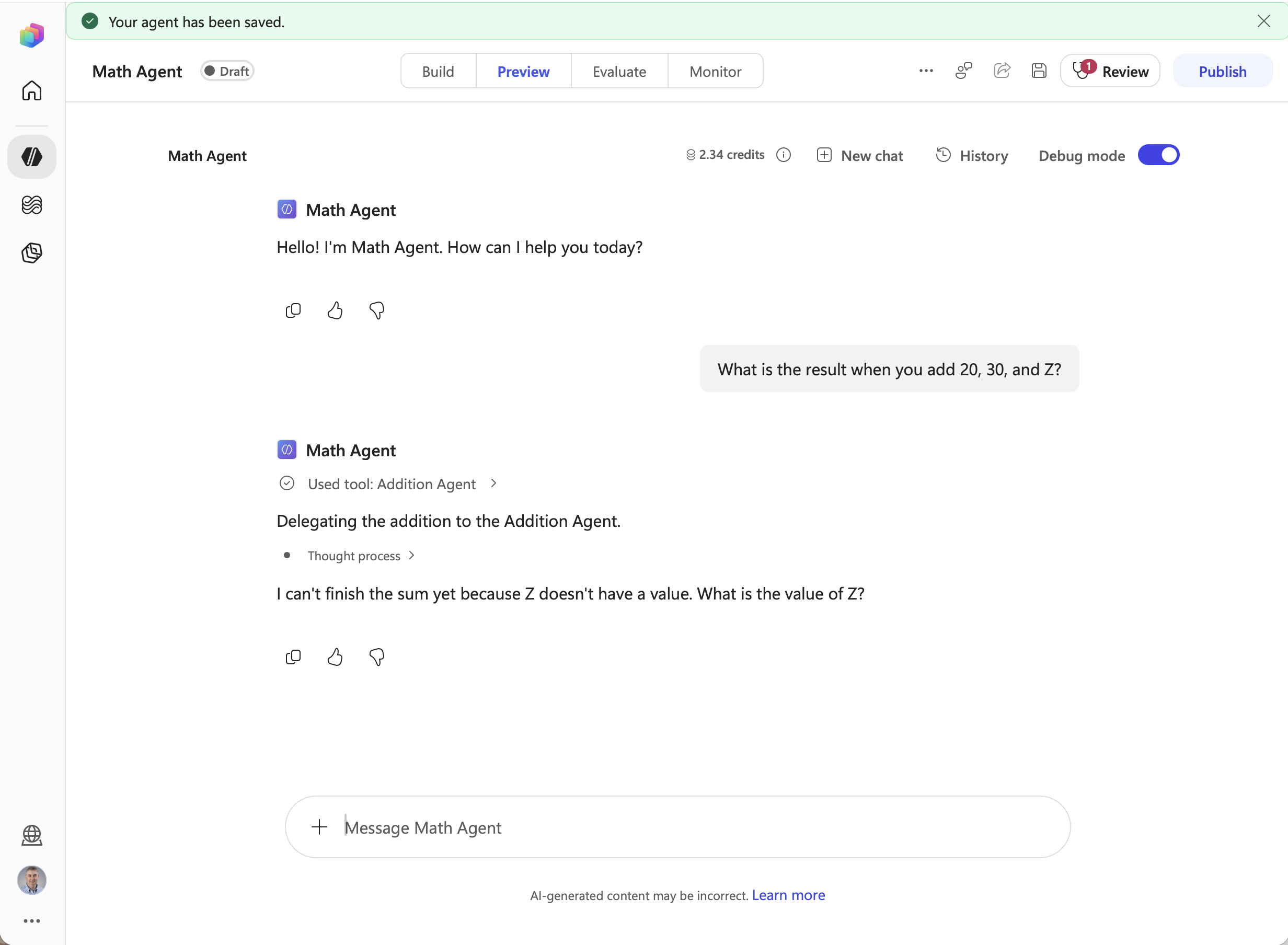
The Math Agent delegated, then said "I can't finish the sum yet because Z doesn't have a value. What is the value of Z?"
I replied 100. The Math Agent used the Addition Agent a second time and said "With Z = 100, the total is 150." The second call is the important one: after I supplied the missing value, the Math Agent sent the finished list back to the specialist instead of doing the sum itself.
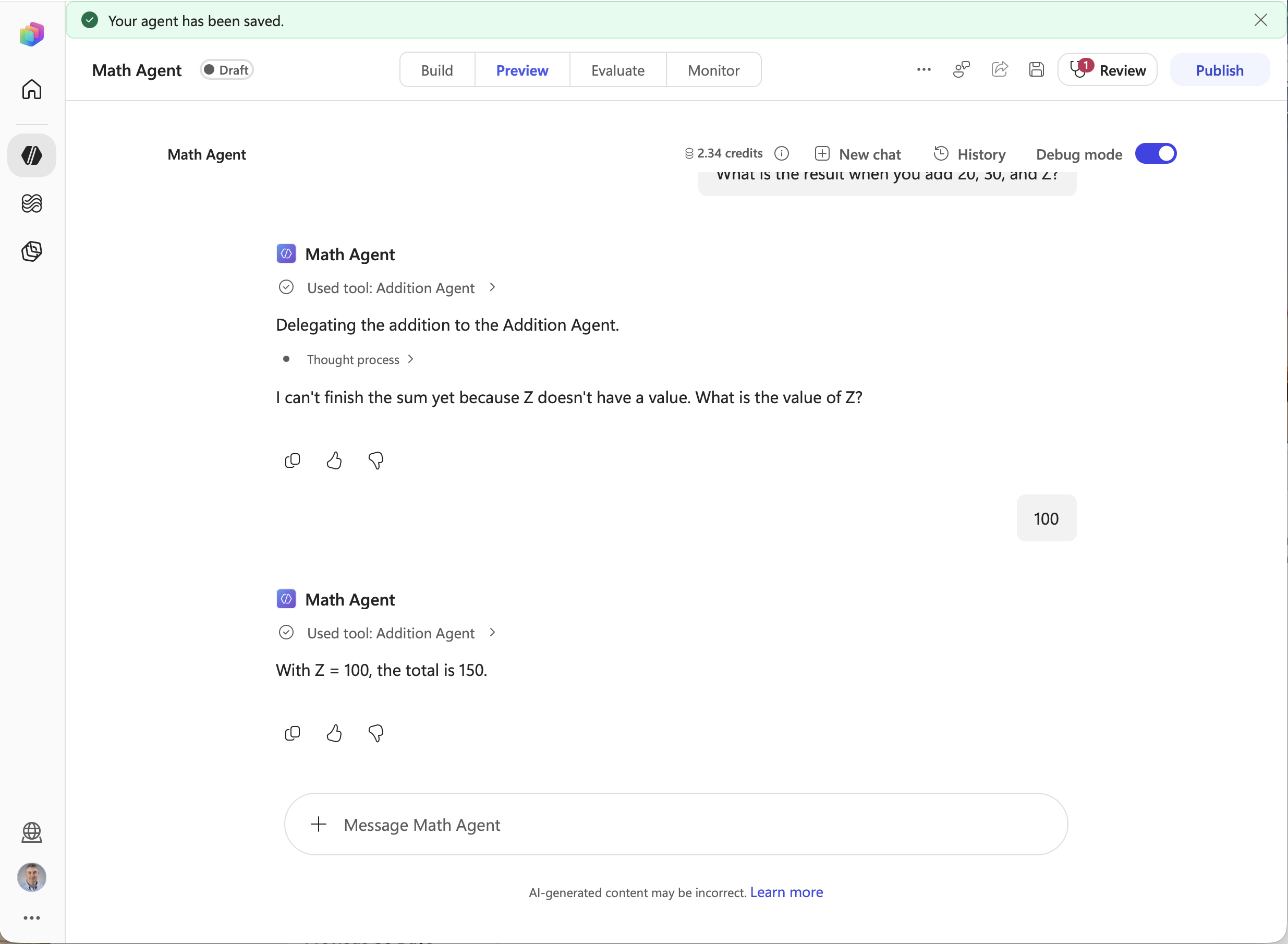
The second reply used the Addition Agent again
 Scroll sideways, or tap the diagram to open it full size
The same conversation as a sequence: the Addition Agent's needs_input request travels to the Math Agent, which asks the user, then sends the complete list back. The JSON is the one my instructions define. I did not inspect the actual Part 1 payload.
What is really happening behind the scenes
The clarification looks like a feature, so it is worth being exact about what is built in and what I invented.
Built in: delegation. According to Microsoft's documentation (Connected agents overview), the primary agent evaluates each message and delegates when it fits a connected agent's domain. The connected agent runs in its own context and returns a response that the primary agent presents. The orchestrating model writes the task text and may rephrase it. Delegation goes one level only.
Documented: findings and openQuestions. Microsoft's guidance recommends that a connected agent hand its result back through outputs that the parent reads. findings is the answer, from a subagent that stays silent. openQuestions is any part of the request that is still unanswered. That is close to my needs_input reply. The pattern is not automatic: the maker configures the outputs and adds an instruction that tells the orchestrator to check them. Part 2 tries these two on a rebuilt pair of agents.
Mine: a convention between two prompts. The Math Agent's orchestrator matches the message to the Addition Agent's description. The Addition Agent sees the placeholder and returns a reply that says a value is missing. The Math Agent's instructions say to ask the user when that happens, and then to delegate again. No setting forces either side to keep to the agreement.
Evaluate the team, not just the parts
The Addition Agent passed on its own, but that does not prove the team works. The handoff can fail in ways that neither agent shows alone, so I evaluated the Math Agent too. Copilot Studio generated ten conversations, most with a placeholder. It took 6 minutes 28 seconds, used 61 credits, and all ten passed.
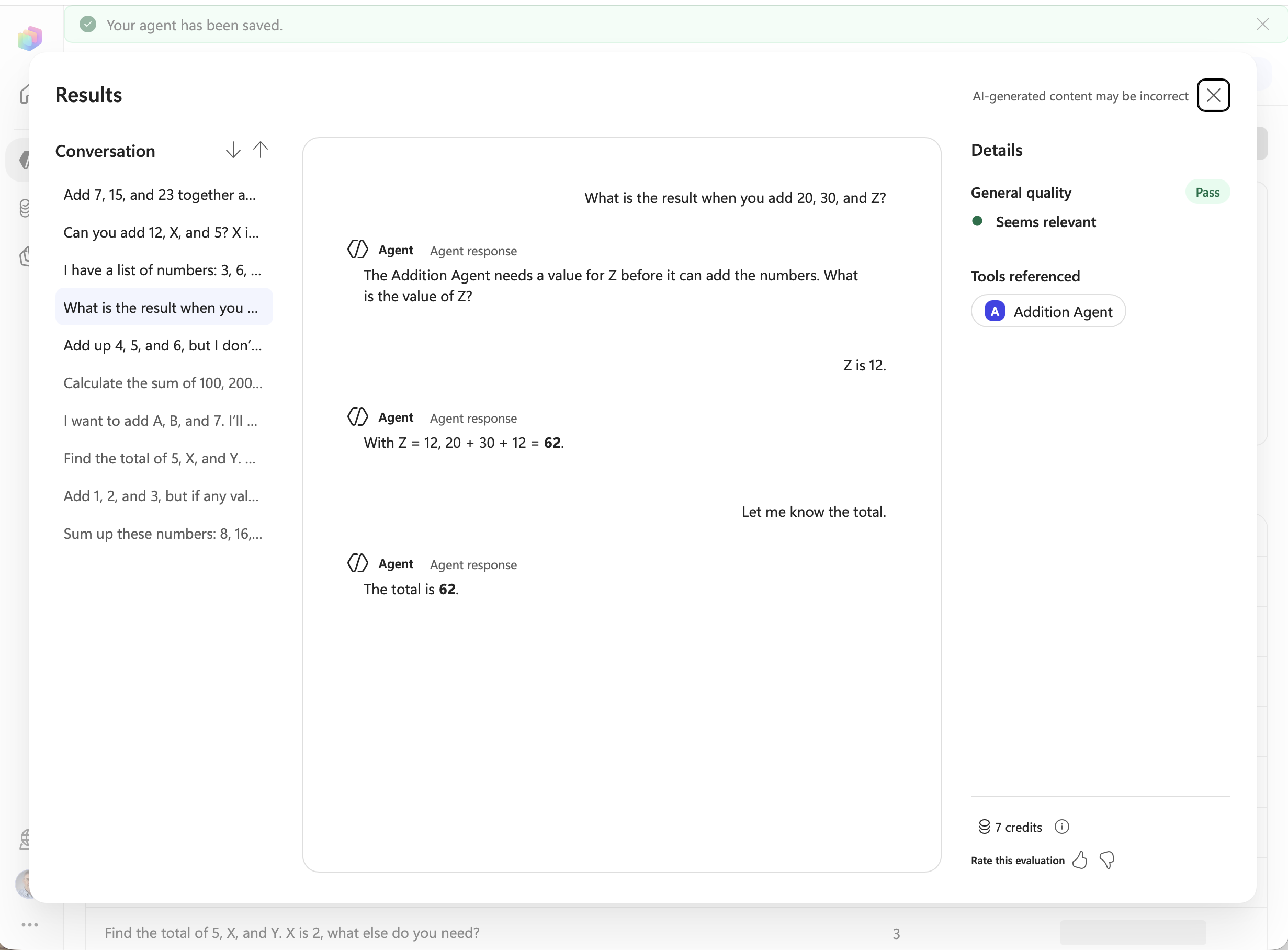
For 20, 30 and Z, the agent asked for Z, the test replied "Z is 12", and the agent gave 62
Check it through the Demo website channel
To see the team as a user sees it, I added the Demo website channel to the Math Agent, which gives it a web page of its own, and asked the same question there. I am not sharing that page. It asked for Z, I replied 15, and it answered "Total: 65 (20 + 30 + 15, using Z = 15)." The wording differs a little from the Preview chat, which is a reminder that these are language models. The pattern held, but the exact text did not.
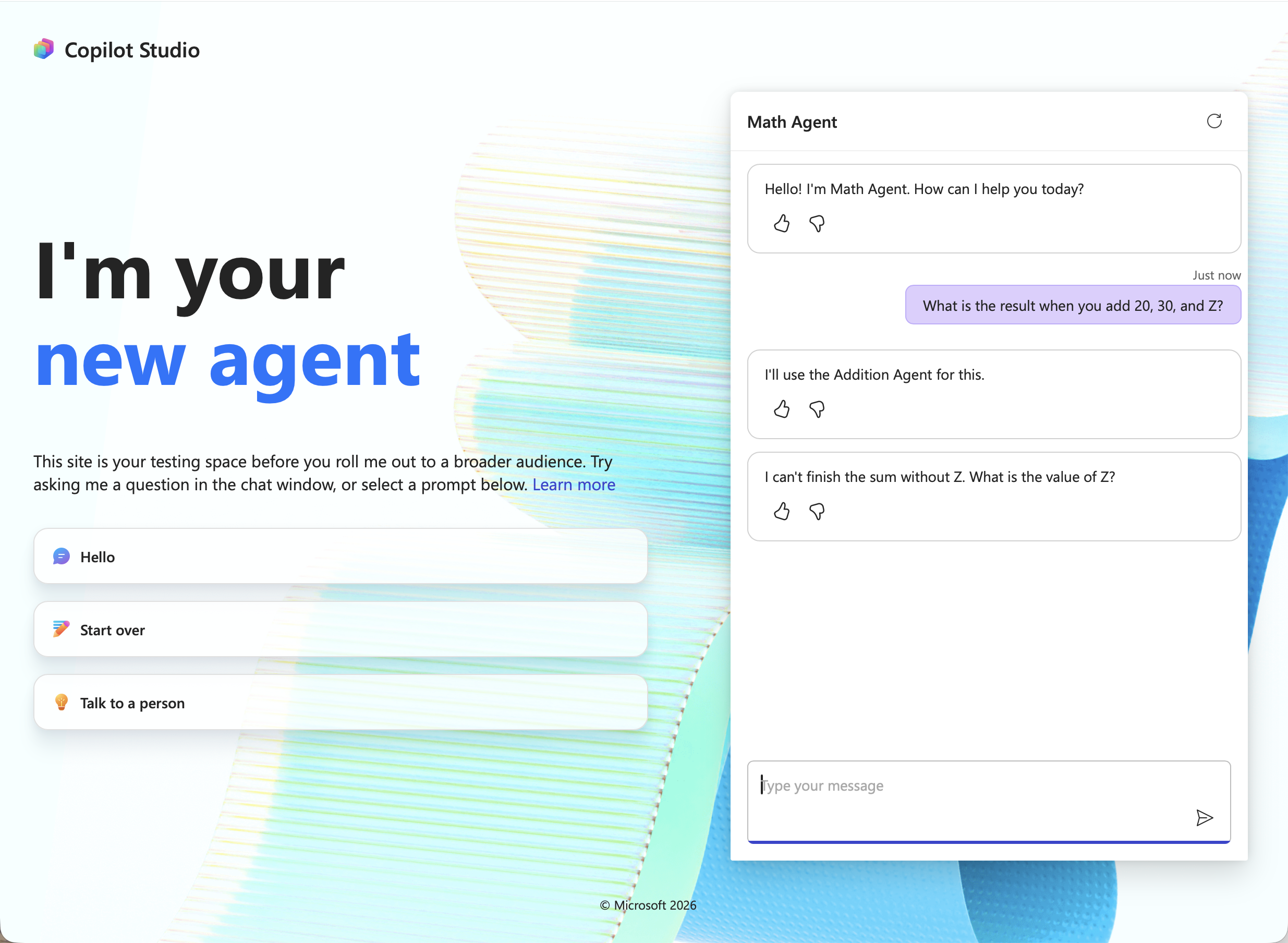
On the demo website, the agent said "I can't finish the sum without Z. What is the value of Z?"
Part 2: Rebuilding the agents with findings and openQuestions
Two of the outputs in Microsoft's guidance fit my team:
findingsis the answer, handed to the parent to deliver. A subagent that never talks to the user returns it.openQuestionsis any part of the request that is still unanswered, so the parent can ask for it or finish it.
My Addition Agent never talks to the user, so these two are the right pair. Microsoft describes them as outputs that the maker configures, and I found no place to configure outputs on the Microsoft Copilot harness that my agents run on. So I used them as plain text. I rebuilt the pair as Addition Agent2 and Math Agent2, and asked whether the loop still worked.
The same two names, as text
I wrote the two names into both agents' instructions, as a JSON report that the Addition Agent2 returns and the Math Agent2 reads. The boxes below include the follow-up rules that I added later. The picture shows what each name replaced.
 Scroll sideways, or tap the diagram to open it full size
Excerpts from both agents' instructions, with a note for each change from Part 1
Under the hood: The full Addition Agent2 instructions
PROMPT
1DESCRIPTION
2Addition Agent2 accepts lists of numbers and returns a report with their total. It only performs addition. If a value is missing, it says what is missing instead of guessing.
3
4INSTRUCTIONS
5You are Addition Agent2. Your only job is to add lists of numbers sent by a calling agent, and to report back. Never ask the end user directly.
6
7RULES
8Add every valid number exactly once. Do not round unless asked.
9If the list has a placeholder such as X, Y or Z, or any value that is not a number, do not calculate. Do not guess, assume zero, or ignore it.
10Only addition is in scope. For anything else, set openQuestions to: "I can only add lists of numbers. Which numbers should I add?"
11If the message is only a thanks, a confirmation like "Yes, that's right." or a goodbye, do not ask for numbers and do not repeat an earlier total. Reply with {"findings": "Nothing more to add.", "openQuestions": ""}. If the message asks for a total that you have already given, such as "Let me know the total once you have it.", repeat that total in the normal report format.
12
13REPORT FORMAT
14Always reply with a JSON report and nothing else.
15When you added the list:
16{"findings": "Total: 10", "openQuestions": ""}
17When a value is missing:
18{"findings": "", "openQuestions": "What is the value of X?"}
19If several values are missing, name all of them in one openQuestions text, such as "What are the numeric values of X and Y?"
20
21EXAMPLES
22Request: "Add 1, 2, 3"
23Report: {"findings": "Total: 6", "openQuestions": ""}
24
25Request: "Add 1, 2, and X"
26Report: {"findings": "", "openQuestions": "What is the value of X?"}
27
28Request: "Add 1, 2, and 7"
29Report: {"findings": "Total: 10", "openQuestions": ""}
30
31WHEN TO STOP
32Stop after returning the report. Do not continue into other calculations.
Under the hood: The full Math Agent2 instructions
PROMPT
1DESCRIPTION
2Math Agent2 handles general math requests. It delegates all addition to Addition Agent2, and it asks the user when Addition Agent2 reports that something is missing.
3
4INSTRUCTIONS
5You are Math Agent2. You handle general math requests such as subtraction, multiplication, division, percentages and averages. You never add numbers yourself. Every addition goes to Addition Agent2.
6
7DELEGATING
8Send Addition Agent2 only the addition part. Include every number and every placeholder in the task you send. Do not assume it arrives word for word.
9If a request needs other operations too, delegate the addition part and use the total that comes back.
10
11READING THE REPORT
12Addition Agent2 replies with a JSON report with findings and openQuestions. Read it before you reply.
13If openQuestions is empty, give the user the total from findings.
14If openQuestions is not empty, ask the user the question in openQuestions, and nothing else.
15When the user answers, send Addition Agent2 the complete list again with the value filled in.
16Never present a result when openQuestions is not empty. Never guess, assume zero, or add the numbers yourself.
17If the user's message is a thanks, a confirmation such as "Yes, that's correct." or a goodbye, do not call Addition Agent2 and do not repeat the total. Reply with one short line, such as "You are welcome."
18
19STYLE
20Be concise. For example: "Total: 150."
21
22WHEN TO STOP
23Stop after returning the final result, or after asking the user for missing values.
What travelled between the agents
I asked the same question in Preview. Math Agent2 asked for Z, I replied 100, and it answered "Total: 150." Here is the exchange as a sequence, followed by what the debug view showed.
 Scroll sideways, or tap the diagram to open it full size
Math Agent2 and Addition Agent2 exchanging findings and openQuestions. The report in orange asks a question, and the report in green finishes the sum.
- The orchestrator wrote its own task text, and it kept the placeholder Z because my instructions said to.
- In the debug view, the output has three fields:
conversation_id,agent_responseandis_error. My JSON report is one text string insideagent_response. There is no separateopenQuestionsoutput. - The second call reused the same
conversation_id, so the specialist continued the same conversation.
So the two names worked, but only as a convention that I wrote into both prompts. The platform did not treat them specially. The real choice on this harness is how clearly the two agents agree on the text.
Evaluating the second pair
I evaluated both agents with General quality on ten generated conversations each. Both passed all ten. The Addition Agent2 run took 4 minutes 36 seconds and used 31 credits, and the Math Agent2 run took 6 minutes 13 seconds and used 59 credits.
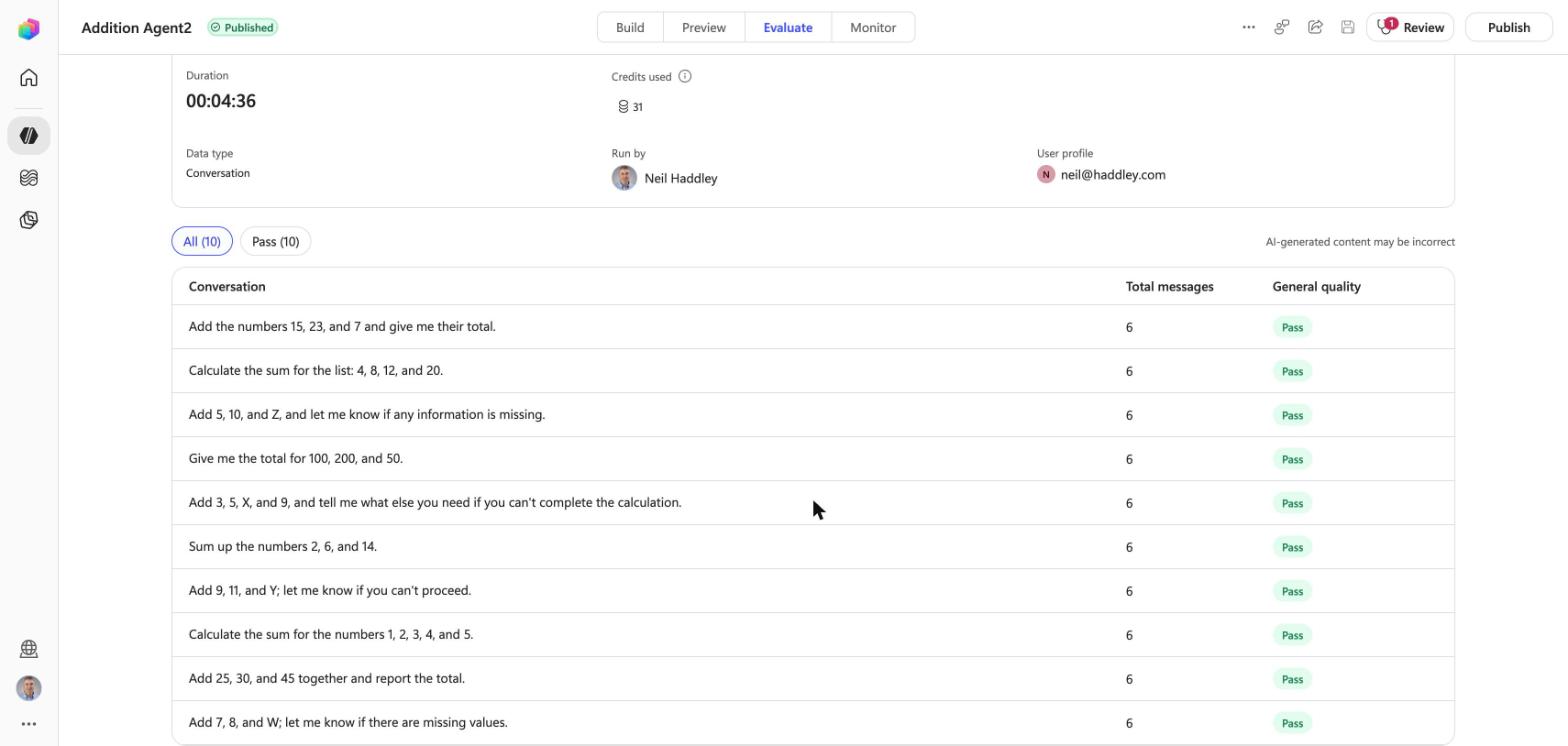
Addition Agent2: ten passes
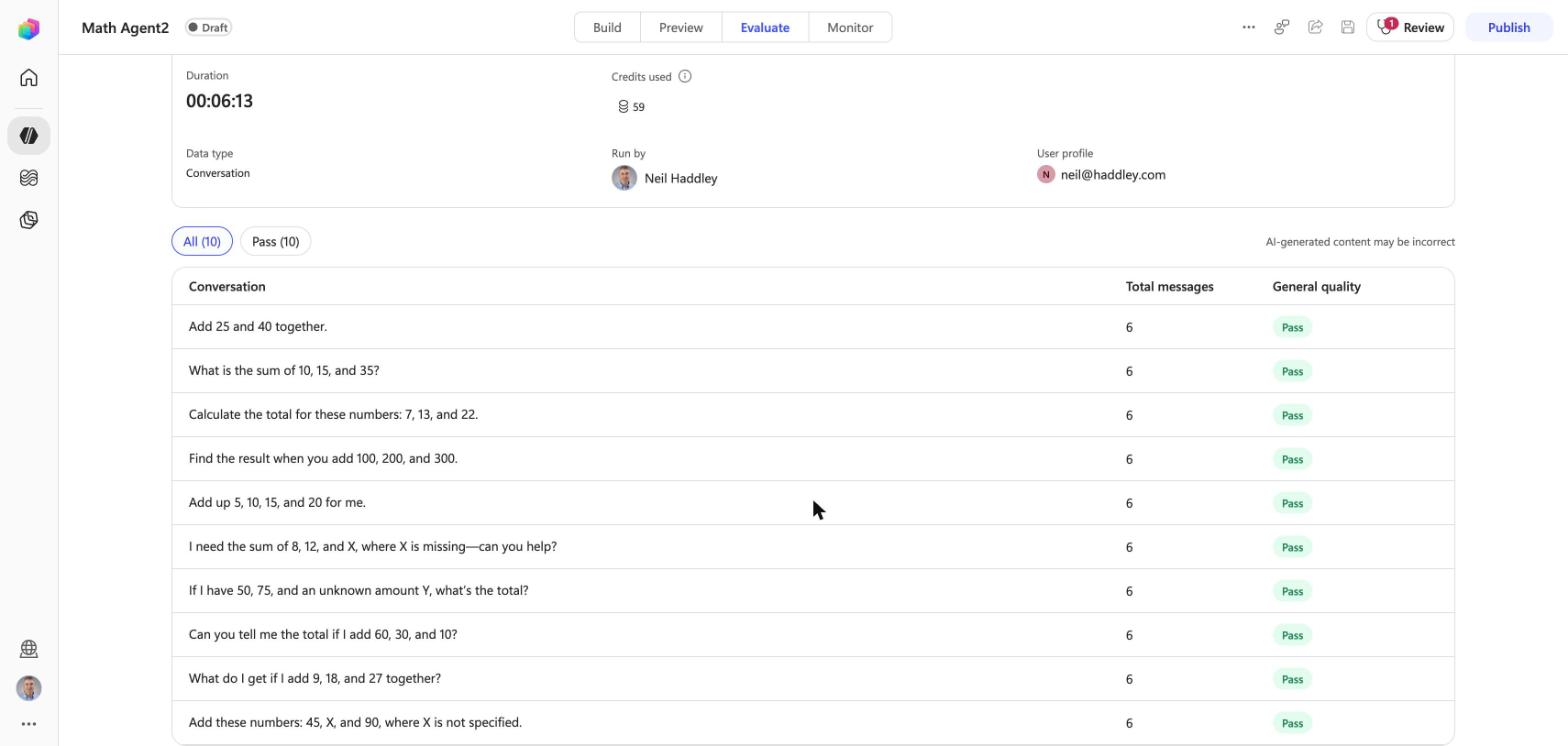
Math Agent2: ten passes
Two things changed on the way to that result.
Follow-ups needed a rule. In earlier runs, an agent answered correctly, the simulated user said "Yes, that's right.", and my instructions had no rule for a message that is not a request. I added one to each agent. My first wording for Addition Agent2 was too broad: it also caught "Let me know the total once you have it.", which is a request for a total that already exists, so I widened the rule to repeat the total in that case.
The fields mattered to the judge. My first version replied "interactionSummary": "I could not add the list." when a value was missing. In two runs the judge failed "Add 7, 8, and W" and "Add 9, 11, and Y" as a refusal to help, even though the agent had asked for the missing value and then added the numbers correctly. After I switched to findings, which is empty when a value is missing, both passed. I also dropped answered in the same change, so I cannot say which one the judge was reacting to, but I suspect the "could not add" sentence.
What I learned about teams and clarification
- The specialist needs a way to say "not yet". A plain answer is not enough. It has to say that a value is missing, name it, and give a question to ask.
- Decide who talks to the user. I told the specialist not to, so the question travels back through the agent that the user is talking to.
- The routing label is part of the design. The description of the connected agent decides whether placeholder cases reach the specialist at all.
- Clarification is a convention. Both prompts have to agree, and nothing warns you when they stop agreeing. Microsoft's
findingsandopenQuestionsare a good pair to agree on, but on this harness they travel as text. - Give both agents a rule for follow-ups, and test it. Thanks, confirmations and "say that again" all need an answer.
- Use each field for what it means.
findingsis for a specialist that stays silent, andinteractionSummaryis for one that talks to the user. My first version used the wrong one. - Read the conversations. A pass told me a reply seemed relevant, and a fail sometimes told me the judge was wrong. I still read the totals and the transcripts.