GraphQL
Neil Haddley • March 1, 2021
Building a GraphQL server with Node, Express and express-graphql, trying queries and mutations in GraphiQL, and reading the data from a React client with Apollo
A REST API client may need to make multiple calls to a REST Service to get all of the data it needs.
A GraphQL API client may be able to request all of the data it needs in a single call.
GraphQL supports reading data, mutating data, and subscribing to data (WebSockets).
GraphQL or OData?
OData is the other well-known answer to the same problem, and it is built into Business Central, Excel and Power BI. A client can also choose its properties and bring related items back in one call, but it does so with query options in the URL, such as $select, $filter and $expand.
The difference is where the power sits. The server in this post can find a book or an author by id, because I wrote an argument for that, and filtering by name would need another argument and more resolver code. In OData, a filter on any property is available without extra server code, and the price is that the service has to decide what it exposes. My OData post puts OData and GraphQL side by side.
Setting up the project
I created a package.json file using the npm init command
BASH
1$ npm init -y
I added the GraphQL dependencies using npm
BASH
1$ npm i express@4.16.4 express-graphql@0.7.1 graphql@14.1.1 cors@2.8.5
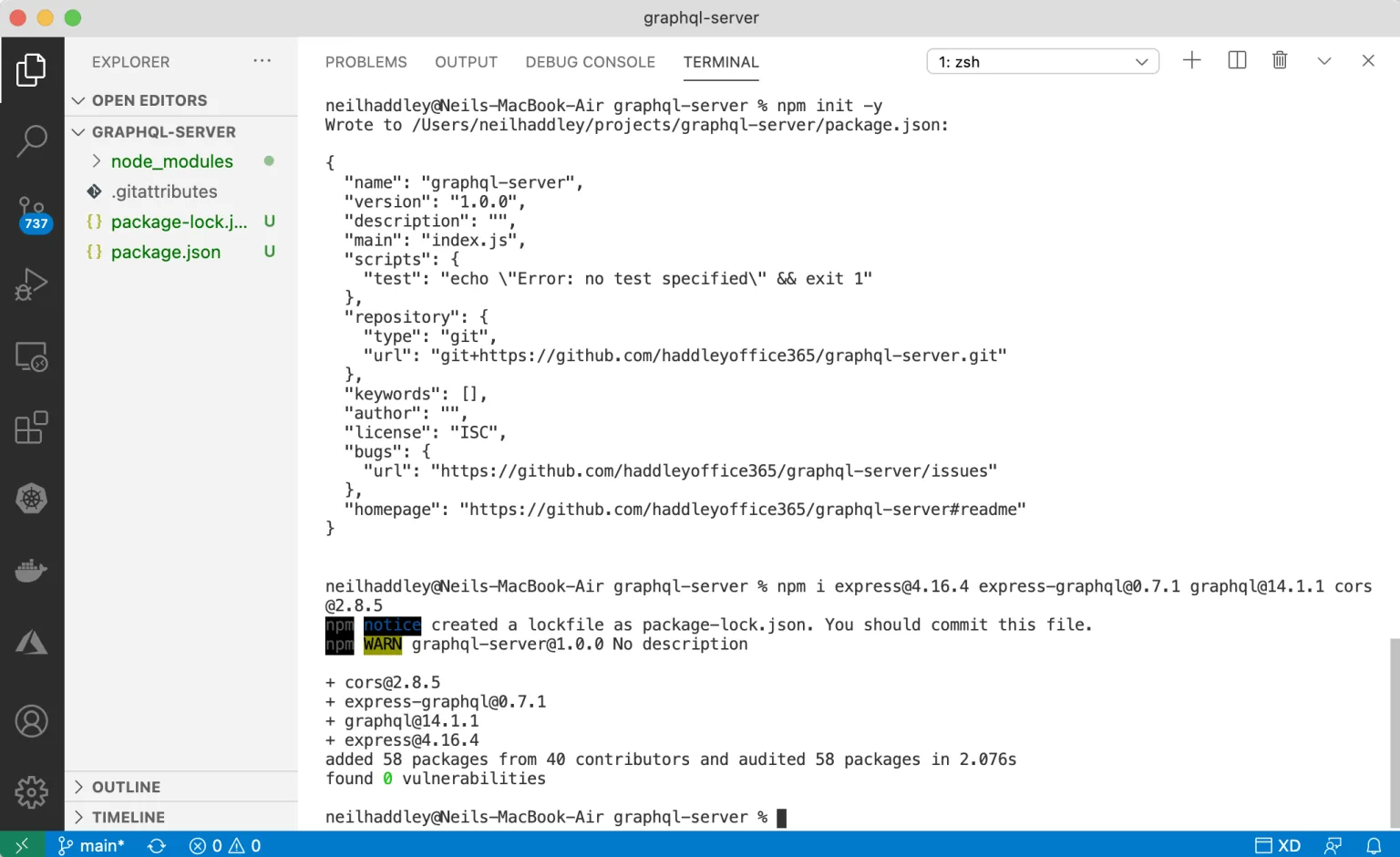
I ran npm i
server.js
Once the dependencies have been added we can create a server.js file.
package.json
Now we can update the package.json file and run the GraphQL service.
"scripts": {
"start": "node server.js"
},
npm start
I used "npm start" to run the GraphQL server.
BASH
1$ npm start

I read books and related author details

I read data for a single author
Under the hood: How one query returns books and their authors
A book in the data holds only authorIds, such as [5, 6]. The Book type in server.js has an authors field with its own resolver, which filters the authors list for the ids in that book. The Author type does the same in reverse with its books field. So when a query asks for books and the name of each author, GraphQL calls the books resolver once and then the authors resolver for each book, and it returns the nested result in one response.

I mutated data by adding an author

I mutated data by adding a book
A GraphQL client app
It is possible to use react and apollo to create a GraphQL client app.
I created a package.json file using the npm init command
BASH
1$ npm init -y
I added the GraphQL and Apollo dependencies using npm
BASH
1$ npm i apollo-boost@0.4.9 graphql@15.4.0 react@17.0.1 react-apollo@3.1.5 react-dom@17.0.1 react-scripts@4.0.1
The app.js code includes a GraphQL query, an ApolloProvider and a Query.

I navigated to localhost:3000
API Gateway
I noticed that the Cross-Origin Resource Sharing (CORS) library reference in the GraphQL code above is not needed when the GraphQL server and the GraphQL client App are published using an API Gateway.
server.js
JAVASCRIPT
1const express = require('express')
2const expressGraphQL = require('express-graphql')
3const {
4  GraphQLSchema,
5  GraphQLObjectType,
6  GraphQLString,
7  GraphQLList,
8  GraphQLInt,
9  GraphQLNonNull
10} = require('graphql')
11
12const cors=require('cors'); // optional
13
14const app = express()
15
16app.use(cors()) // optional
17
18const authors = [
19  { id: 1, name: 'Samer Buna' },
20  { id: 2, name: 'Robin Wieruch' },
21  { id: 3, name: 'Nader Dabit' },
22  { id: 4, name: 'Sebastian Grebe' },
23  { id: 5, name: 'Eve Porcello' },
24  { id: 6, name: 'Alex Banks' }
25]
26
27const books = [
28  { id: 1, isbn10: '161729568X', name: 'GraphQL in Action', authorIds: [1] },
29  { id: 2, isbn10: '1730853935', name: 'The Road to GraphQL: Your journey to master pragmatic GraphQL in JavaScript with React.js and Node.js', authorIds: [2] },
30  { id: 3, isbn10: '1492059897', name: 'Full Stack Serverless: Modern Application Development with React, AWS, and GraphQL', authorIds: [3] },
31  { id: 4, isbn10: '1789134528', name: 'Hands-On Full-Stack Web Development with GraphQL and React', authorIds: [4] },
32  { id: 5, isbn10: '1492030716', name: 'Learning GraphQL: Declarative Data Fetching for Modern Web Apps', authorIds: [5, 6] },
33  { id: 6, isbn10: '1492051721', name: 'Learning React: Modern Patterns for Developing React Apps', authorIds: [5, 6] },
34]
35
36const BookType = new GraphQLObjectType({
37  name: 'Book',
38  description: 'This represents a book written by an author',
39  fields: () => ({
40    id: { type: GraphQLNonNull(GraphQLInt) },
41    name: { type: GraphQLNonNull(GraphQLString) },
42    isbn10: { type: GraphQLNonNull(GraphQLString) },
43    authorIds: { type: GraphQLNonNull(GraphQLList(GraphQLInt)) },
44    authors: {
45      type: new GraphQLList(AuthorType),
46      resolve: (book) => {
47        return authors.filter(author => (book.authorIds.includes(author.id)))
48      }
49    }
50  })
51})
52
53const AuthorType = new GraphQLObjectType({
54  name: 'Author',
55  description: 'This represents an author of a book',
56  fields: () => ({
57    id: { type: GraphQLNonNull(GraphQLInt) },
58    name: { type: GraphQLNonNull(GraphQLString) },
59    books: {
60      type: new GraphQLList(BookType),
61      resolve: (author) => {
62        return books.filter(book => (book.authorIds.includes(author.id)))
63      }
64    }
65  })
66})
67
68const RootQueryType = new GraphQLObjectType({
69  name: 'Query',
70  description: 'Root Query',
71  fields: () => ({
72    book: {
73      type: BookType,
74      description: 'A Single Book',
75      args: {
76        id: { type: GraphQLInt }
77      },
78      resolve: (parent, args) => books.find(book => book.id === args.id)
79    },
80    books: {
81      type: new GraphQLList(BookType),
82      description: 'List of All Books',
83      resolve: () => books
84    },
85    authors: {
86      type: new GraphQLList(AuthorType),
87      description: 'List of All Authors',
88      resolve: () => authors
89    },
90    author: {
91      type: AuthorType,
92      description: 'A Single Author',
93      args: {
94        id: { type: GraphQLInt }
95      },
96      resolve: (parent, args) => authors.find(author => author.id === args.id)
97    }
98  })
99})
100
101const RootMutationType = new GraphQLObjectType({
102  name: 'Mutation',
103  description: 'Root Mutation',
104  fields: () => ({
105    addBook: {
106      type: BookType,
107      description: 'Add a book',
108      args: {
109        name: { type: GraphQLNonNull(GraphQLString) },
110        isbn10: { type: GraphQLNonNull(GraphQLString) },
111        authorIds: { type: GraphQLNonNull(GraphQLList(GraphQLInt)) }
112      },
113      resolve: (parent, args) => {
114        const book = { id: books.length + 1, name: args.name, isbn10: args.isbn10, authorIds: args.authorIds }
115        books.push(book)
116        return book
117      }
118    },
119    addAuthor: {
120      type: AuthorType,
121      description: 'Add an author',
122      args: {
123        name: { type: GraphQLNonNull(GraphQLString) }
124      },
125      resolve: (parent, args) => {
126        const author = { id: authors.length + 1, name: args.name }
127        authors.push(author)
128        return author
129      }
130    }
131  })
132})
133
134const schema = new GraphQLSchema({
135  query: RootQueryType,
136  mutation: RootMutationType
137})
138
139app.use('/graphql', expressGraphQL({
140  schema: schema,
141  graphiql: true
142}))
143app.listen(5000, () => console.log('Server Running'))
package.json
JAVASCRIPT
1{
2  "name": "graphql-server",
3  "version": "1.0.0",
4  "description": "",
5  "main": "index.js",
6  "scripts": {
7    "start": "node server.js"
8  },
9  "repository": {
10    "type": "git",
11    "url": "git+https://github.com/haddleyoffice365/graphql-server.git"
12  },
13  "keywords": [],
14  "author": "",
15  "license": "ISC",
16  "bugs": {
17    "url": "https://github.com/haddleyoffice365/graphql-server/issues"
18  },
19  "homepage": "https://github.com/haddleyoffice365/graphql-server#readme",
20  "dependencies": {
21    "cors": "^2.8.5",
22    "express": "^4.16.4",
23    "express-graphql": "^0.7.1",
24    "graphql": "^14.1.1"
25  }
26}
app.js
JAVASCRIPT
1import ApolloClient from 'apollo-boost';
2import { ApolloProvider, Query } from 'react-apollo';
3import gql from 'graphql-tag';
4
5const client = new ApolloClient({
6  uri: 'http://localhost:5000/graphql'
7})
8
9const query = gql`
10query booksQuery {
11  books {
12    id,
13    name,
14    authors
15    {
16      name
17    }
18  }
19}
20`
21
22function App() {
23
24  return (
25
26    <ApolloProvider client={client}>
27
28      <div>
29
30        <Query query={query}>
31          {
32            ({ loading, error, data }) => {
33              if (loading) return <h4>Loading...</h4>
34              if (error) console.log({ error })
35              return data.books.map(book =>
36                <>
37                  <h3 key={book.id}>{book.name}</h3>
38                  {book.authors.map(author =>
39                    <h4>{author.name}</h4>)}
40                </>
41              )
42            }
43          }
44        </Query>
45
46      </div>
47
48    </ApolloProvider>
49
50  );
51}
52
53export default App;