Part 1 ended with a bare ATtiny85 blinking an LED. A blink program only drives a pin. This time the same chip has to read a signal, measure it, and drive a second signal from it, all in real time.
The project is an e-bike speed limiter. A hub motor has a speed sensor: a ring of 6 magnets and a hall sensor that pulls a white wire LOW each time a magnet passes. The motor controller counts those pulses to work out how fast the wheel turns. I cut that white wire and put the ATtiny85 in the gap.
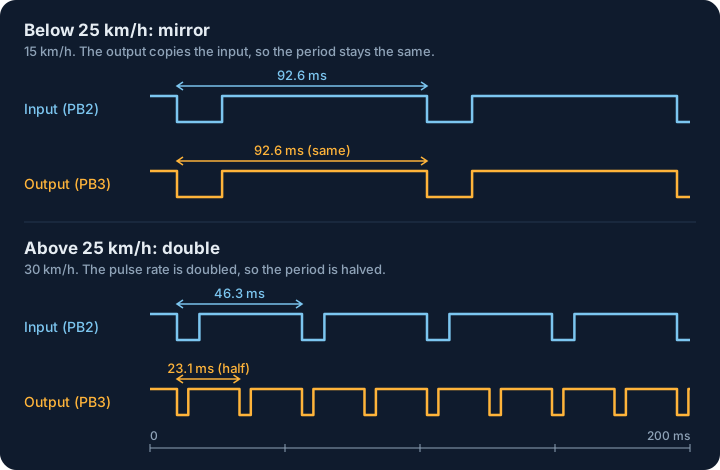
- Below 25 km/h, the chip copies the signal straight through, so the controller sees the true speed.
- Above 25 km/h, the chip sends pulses at twice the input rate, so the controller sees twice the true speed. I hoped that a controller set to a limit above 25 km/h would then cut assistance at about 25 km/h real speed. Part 3 shows what happened when I tried it on the bike.
 Scroll sideways, or tap the diagram to open it full size
Drawn to the same 200 ms time scale: at 15 km/h the output keeps the input's 92.6 ms period, and at 30 km/h it sends two pulses for every one it receives, so its period drops from 46.3 ms to 23.1 ms
The ATtiny85 sits in the cut speed wire and takes its power from the controller's own 5 V rail
Why 25 km/h
The threshold comes from the law where I would ride. Transport for NSW says that a road-legal e-bike in NSW must have:
- a maximum continuous rated power of 500 watts
- a motor that provides throttle power assistance up to 6 km/h, or up to 25 km/h when the rider is pedalling
- a motor that does not provide power at speeds higher than 25 km/h
Many e-bikes on sale assist well past that. Velowave advertises its Ranger 1.0 fat tire e-bike as reaching "up to 28MPH in pedal assist mode", which is about 45 km/h. A bike like that needs its assistance limited to 25 km/h before I can ride it legally in NSW, and that is the job of this chip.
The law also allows a throttle to assist up to 6 km/h. I disabled the throttle altogether, so the only assistance left is pedal assist, and the chip only has to keep that below 25 km/h.
A fake wheel in Tinkercad
I did not want to test this on a moving bike first, so I built the bench test in Tinkercad, as I did in Part 1. Tinkercad can run two microcontrollers in one circuit, each with its own code. I used an Arduino Uno as a wheel simulator and the ATtiny as the device under test.
The bench version of the circuit, with an oscilloscope on each side of the chip
The Uno sketch converts a target speed into a pulse train that matches a real 6-magnet hub: idle HIGH, with a short LOW pulse for each magnet. These are its main settings:
C
1const float    WHEEL_DIAMETER_M = 0.7366f;  // 29 inch
2const uint8_t  MAGNETS          = 6;        // 6-magnet speed ring
3const float    SPEED_KMH        = 15.0f;    // the speed I change between runs
4const float    DUTY_CYCLE       = 0.18f;    // 18 % LOW, 82 % HIGH
In setup() it turns the speed into a period:
C
1float speed_ms        = SPEED_KMH * 1000.0f / 3600.0f;
2float circumference_m = PI * WHEEL_DIAMETER_M;
3float rps             = speed_ms / circumference_m;
4float pps             = rps * MAGNETS;
5periodUs              = (uint32_t)(1000000.0f / pps);
| Speed | Input period | Input LOW pulse | Mode | Output period | Output LOW pulse |
|---|---|---|---|---|---|
| 15 km/h (below 25) | 92.6 ms | 16.7 ms | mirror | 92.6 ms | 16.7 ms |
| 30 km/h (above 25) | 46.3 ms | 8.3 ms | double | 23.1 ms | 4.2 ms |
Below 25 km/h: mirror
I set SPEED_KMH to 15, well below the 25 km/h threshold, and started the simulation. Both scopes show the same thing: one LOW pulse in each 100 ms window, because at 15 km/h a magnet passes every 92.6 ms. The output copies the input.
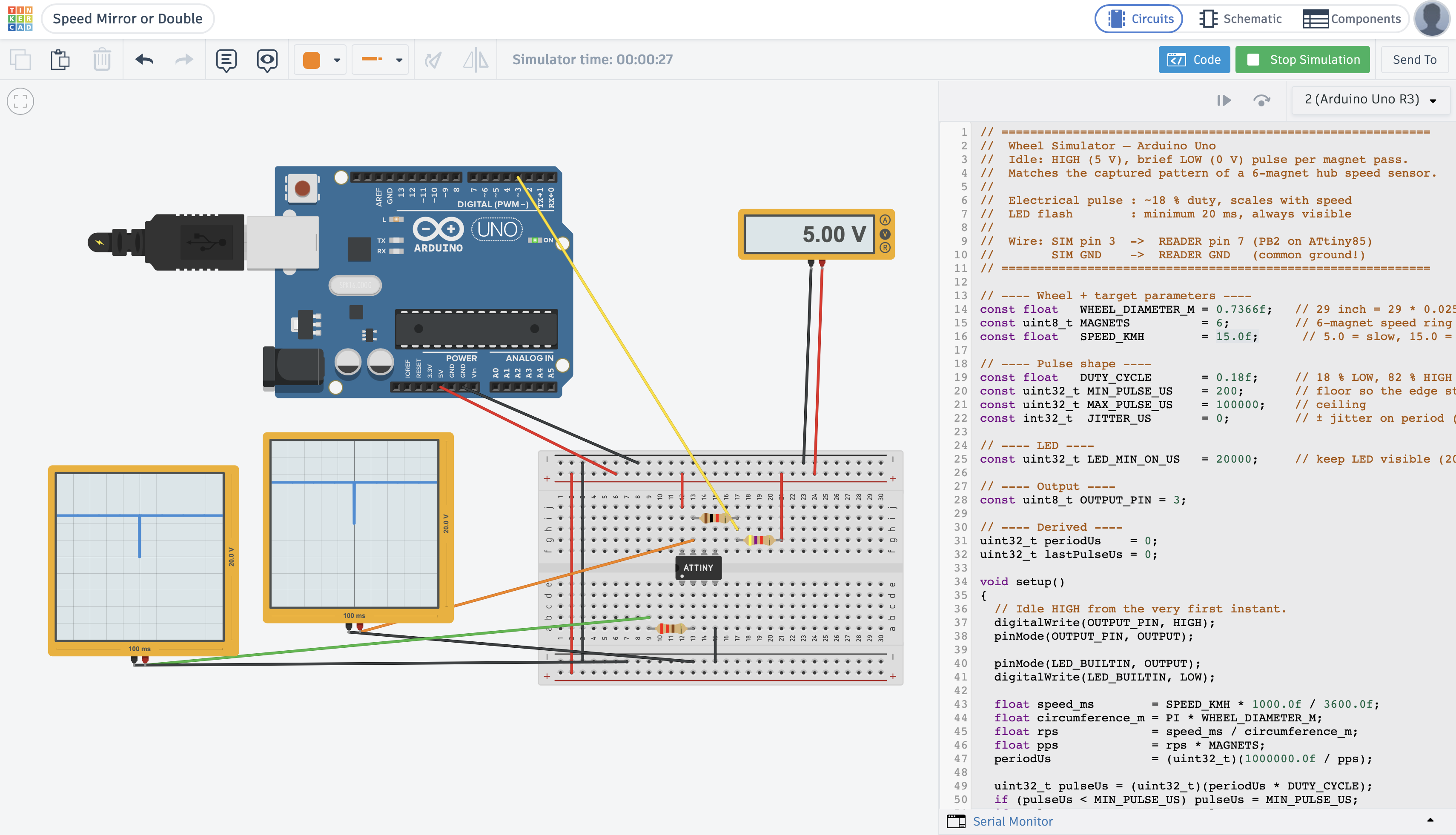
At 15 km/h both scopes show a single LOW pulse per window, so the ATtiny passes the signal straight through
Above 25 km/h: double
I changed SPEED_KMH to 30, just above the 25 km/h threshold, and ran it again. Now the scopes disagree. The right scope, on the input, shows about two pulses per 100 ms window, one every 46 ms. The left scope, on the output, shows about four, one every 23 ms.
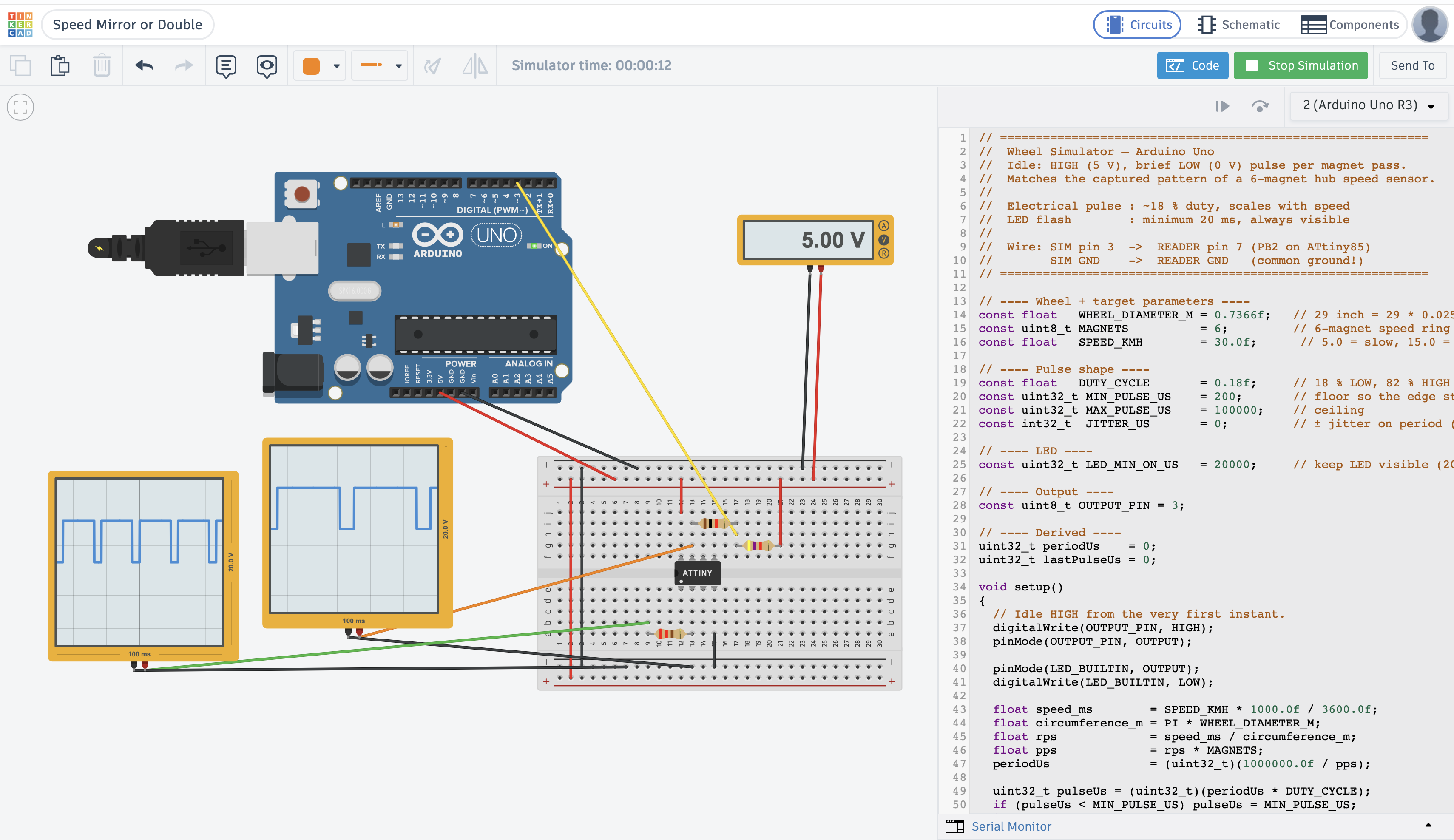
Above 25 km/h (here 30 km/h) the output (left) has twice as many pulses as the input (right)
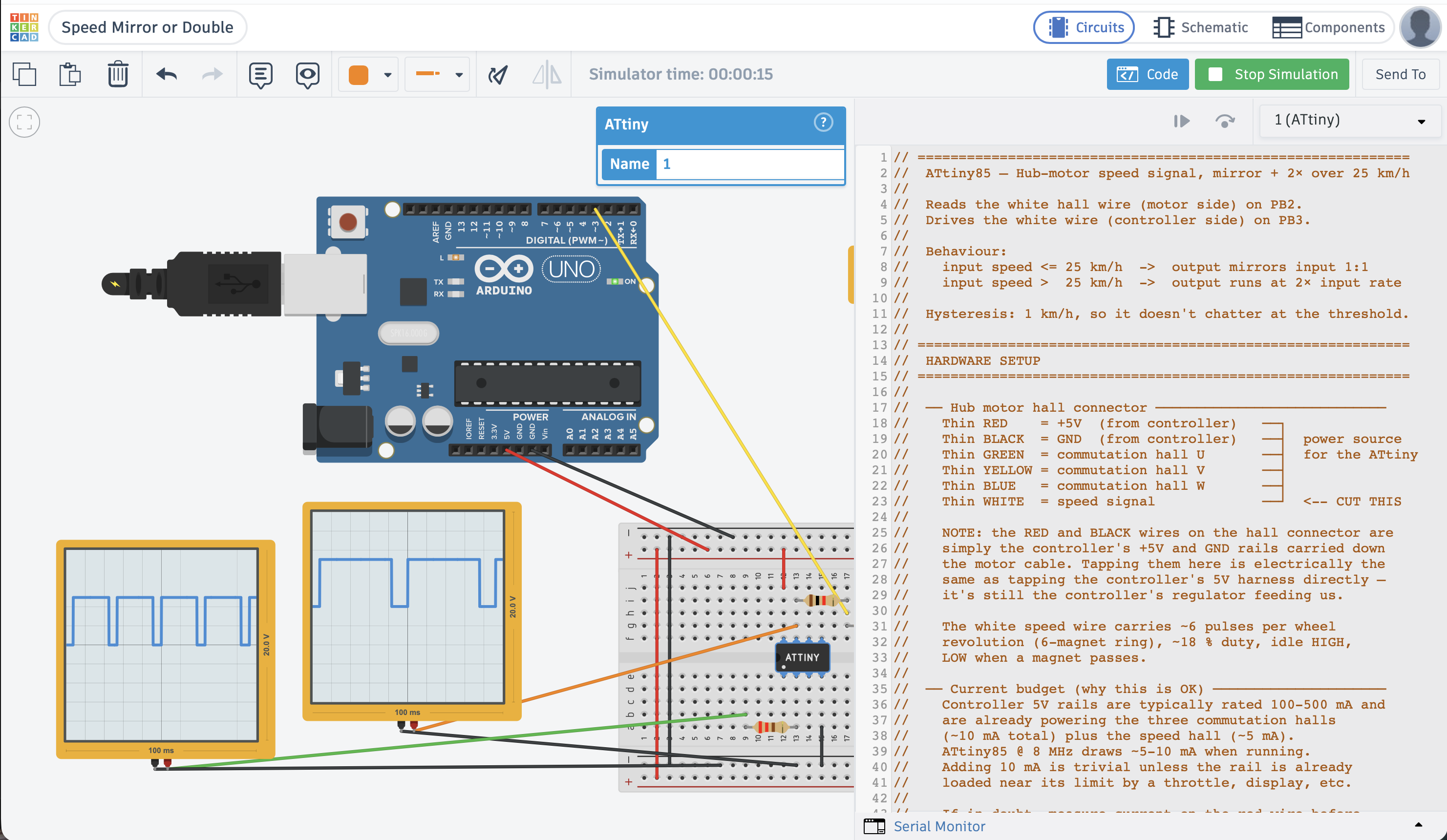
The same run with the ATtiny's code open. The header comment describes the behaviour and how the hub connector's wires are used.
The real breadboard
I then built the same circuit on a real breadboard, turned to match the Tinkercad view: the ATtiny85 across the centre gap, the yellow signal wire coming in through the input resistor at the bottom, and the output resistor and power links along the top.
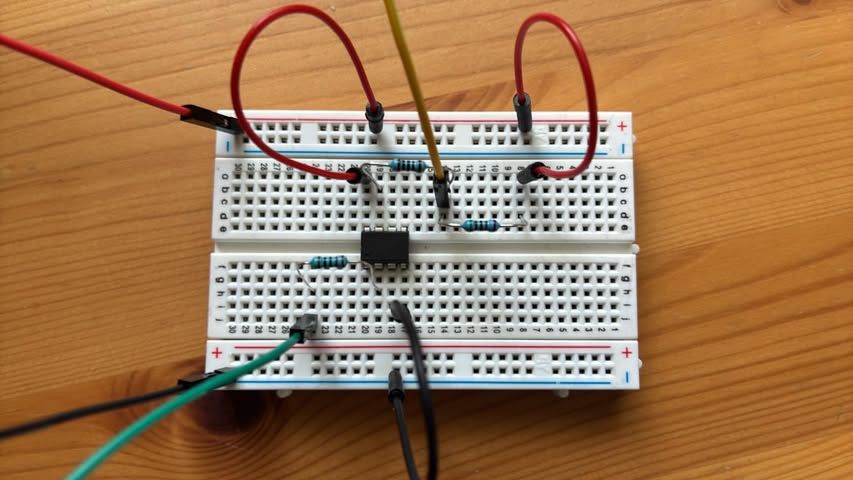
I built the circuit on a real breadboard, in the same layout as the Tinkercad design
On the bike
For a first field test I put the breadboard in the bike's frame bag and wired it into the cut speed wire.
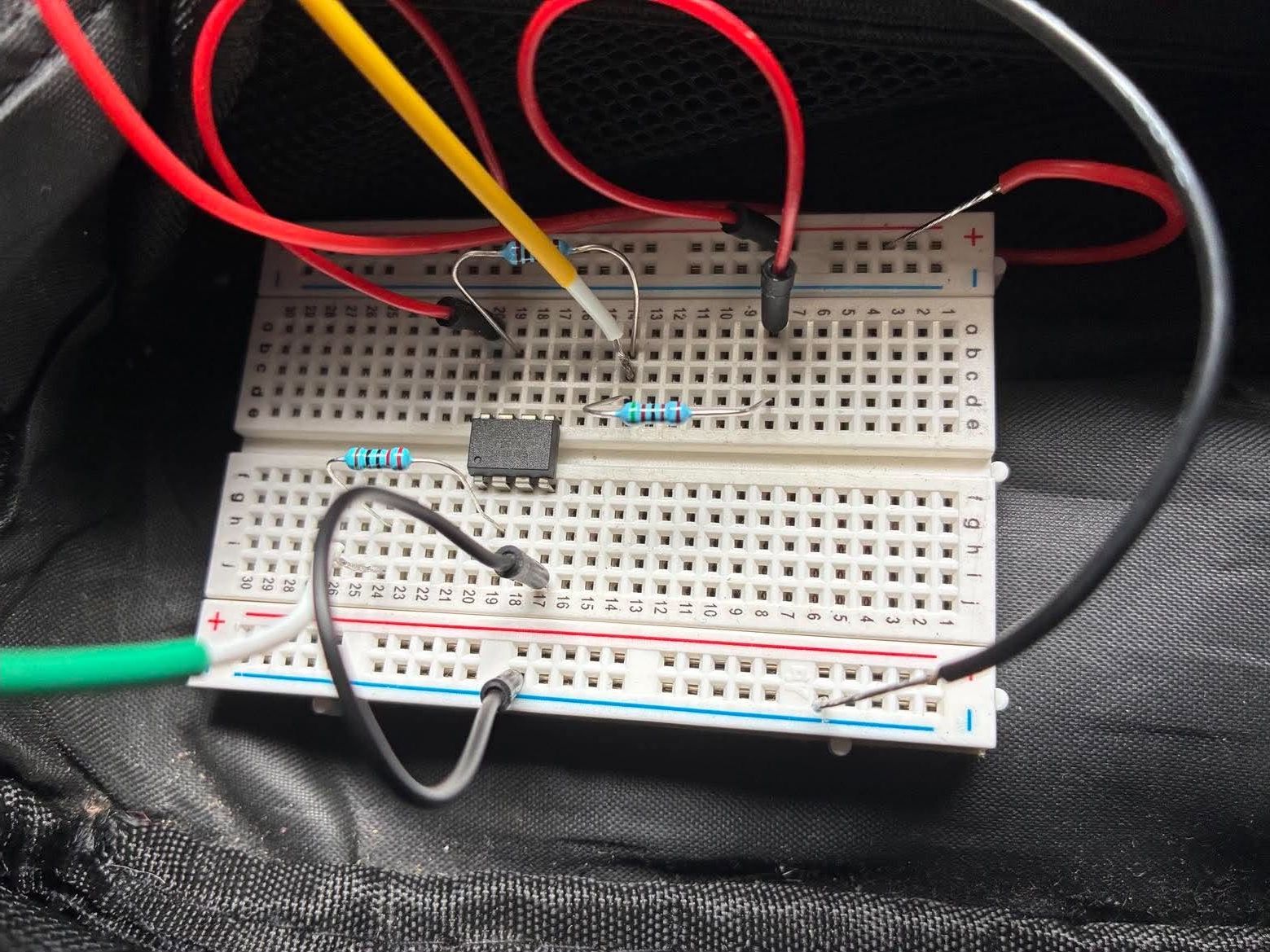
I put the breadboard in the frame bag, with the ATtiny85 between the hub motor's speed wire and the controller's
Then I filmed the bike's display while the wheel sped up and slowed down.
The display climbs through 14, 19 and 26 km/h, jumps to about 53 km/h when the chip starts doubling, falls through 50 km/h as the wheel slows, and drops back to 23 km/h when the chip returns to mirroring
The display shows both cases:
- Below 25 km/h, it shows the true speed, because the chip mirrors the signal.
- Above 25 km/h, it shows about twice the true speed. A reading of 53 km/h means the wheel is turning at about 26.5 km/h.
The display lags the chip a little, so it shows 26 and 28 km/h for a moment before the jump. On the way down, the readings of 49 and 50 km/h are a true speed between 24 and 25 km/h. The chip keeps doubling until the speed falls below 24 km/h (the hysteresis in the code), and then the display drops straight to 23 km/h.
The display did what I wanted. The motor, however, seemed to keep assisting after the display doubled, so the doubled speed did not stop it. In Part 3 I look for another way to cut the motor.
The problem: two modes, two timing budgets
The two modes want different things from the chip, and that conflict shapes the whole program.
Mirror mode needs the output to follow the input within microseconds. If the main loop copies the level, the copy waits for whatever the loop is doing, so it lags and jitters. The only place that sees every edge the moment it happens is the pin-change interrupt service routine (ISR).
Doubling mode needs pulses that do not correspond to any input edge. The chip has to generate them, which means waiting between them. Waiting inside the ISR is a bad idea:
C
1ISR(PCINT0_vect) {
2    digitalWrite(OUT_PIN, LOW);
3    delayMicroseconds(6000);       // blocks for 6 ms
4    digitalWrite(OUT_PIN, HIGH);
5}
While the ISR sits in delayMicroseconds, it cannot see new input edges, and those edges are the measurements the speed calculation depends on.
The answer is to split the work by mode:
| Mode | Who drives PB3 | Why |
|---|---|---|
| Mirror (below 25 km/h) | The ISR, on every edge | Lowest latency, exact level tracking |
| Doubling (above 25 km/h) | The main loop | It has to schedule pulses, and the ISR cannot wait without missing edges |
The ISR measures and mirrors; the loop decides and generates. Three values and one flag cross between them.
The ISR
The ISR records three facts about the input and nothing more: the time of the last falling edge, the period between falling edges, and the width of the last LOW pulse. It does not compute speed and it never writes doubling.
C
1ISR(PCINT0_vect)
2{
3  uint32_t now  = micros();
4  bool     high = (PINB & (1 << HALL_IN_PIN)) != 0;
5
6  if (high) {
7    // Rising edge — capture LOW pulse width
8    if (tFallUs != 0) {
9      lowUs = now - tFallUs;
10    }
11  } else {
12    // Falling edge — capture period, flag new measurement
13    if (tFallUs != 0) {
14      periodUs = now - tFallUs;
15      newMeas  = true;
16    }
17    tFallUs = now;
18  }
19
20  // Mirror mode: copy input level straight to output
21  if (!doubling) {
22    if (high) PORTB |=  (1 << OUT_PIN);
23    else      PORTB &= ~(1 << OUT_PIN);
24  }
25}
The mirror path writes PORTB directly instead of calling digitalWrite, which keeps the copy to a couple of instructions.
The loop
Once per input cycle, when the ISR sets newMeas, the loop does four things:
- Converts period to speed. One wheel revolution takes
period × 6, sospeed = circumference / (period × 6), times 3.6 for km/h. - Chooses the mode, with hysteresis. It enters doubling above 25 km/h and leaves below 24 km/h, so a speed that hovers at 25 does not flip the mode on every pulse.
- Precomputes the output schedule. When doubling,
outPeriodUs = period / 2andoutPulseUs = pulse / 2, which keeps the 18 % duty cycle. - Handles transitions, which is the subtle part (see below).
The three states the output can be in. The 1 km/h gap between the two thresholds is the hysteresis.
Between measurements the loop runs the doubling scheduler. It checks micros(), and if a full output period has passed since the last pulse, it emits one:
C
1if (doubling) {
2  uint32_t nowUs = micros();
3  if ((uint32_t)(nowUs - tOutLastUs) >= outPeriodUs) {
4    tOutLastUs += outPeriodUs;
5    digitalWrite(OUT_PIN, LOW);
6    delayMicroseconds(outPulseUs);
7    digitalWrite(OUT_PIN, HIGH);
8  }
9}
tOutLastUs += outPeriodUs rather than tOutLastUs = nowUs keeps the schedule from drifting: a late pulse does not push every later pulse back.
The hard part: mode transitions
Transitions are where two independent pieces of code, the ISR and the loop, could both be driving PB3.
Both transitions happen inside the newMeas branch, so they line up with a real falling edge
- Mirror to doubling: the loop resets the scheduler with
tOutLastUs = micros(), so the first synthetic pulse comes one full output period later rather than at some random moment. - Doubling to mirror: the loop copies the current input level to the output with
digitalWrite(OUT_PIN, digitalRead(HALL_IN_PIN)). From then on, the ISR keeps them in step.
Edge cases the code guards
| Case | Guard |
|---|---|
| Very short glitch pulse | Reject measurements where the period is under 1 ms |
| Stopped wheel | Reject measurements where the period is over 1 s |
| Pulse wider than the period | Reject when w >= p, which can only be noise |
| No measurement for 1 s | Go idle: output HIGH, doubling = false |
| Output faster than 1 kHz | Clamp outPeriodUs to 1 ms |
| Output pulse too short | Clamp outPulseUs to 500 µs |
| Output pulse as wide as the period | Clamp outPulseUs to outPeriodUs / 2 |
Under the hood: The full ATtiny85 sketch
The header comment explains the wiring, the power budget, and a bench test to run before riding. The bench-test table near the end gives the period and pulse width I expect on PB3 at each simulator speed.
C
1// ============================================================
2//  ATtiny85 — Hub-motor speed signal, mirror + 2× over 25 km/h
3//
4//  Reads the white hall wire (motor side) on PB2.
5//  Drives the white wire (controller side) on PB3.
6//
7//  Behaviour:
8//    input speed <= 25 km/h  ->  output mirrors input 1:1
9//    input speed >  25 km/h  ->  output runs at 2× input rate
10//
11//  Hysteresis: 1 km/h, so it doesn't chatter at the threshold.
12//
13// ============================================================
14//  HARDWARE SETUP
15// ============================================================
16//
17//  ── Hub motor hall connector ────────────────────────────
18//    Thin RED    = +5V  (from controller)   ──┐
19//    Thin BLACK  = GND  (from controller)   ──┤  power source
20//    Thin GREEN  = commutation hall U       ──┤  for the ATtiny
21//    Thin YELLOW = commutation hall V       ──┤
22//    Thin BLUE   = commutation hall W       ──┤
23//    Thin WHITE  = speed signal             ──┘  <-- CUT THIS
24//
25//    NOTE: the RED and BLACK wires on the hall connector are
26//    simply the controller's +5V and GND rails carried down
27//    the motor cable. Tapping them here is electrically the
28//    same as tapping the controller's 5V harness directly —
29//    it's still the controller's regulator feeding us.
30//
31//    The white speed wire carries ~6 pulses per wheel
32//    revolution (6-magnet ring), ~18 % duty, idle HIGH,
33//    LOW when a magnet passes.
34//
35//  ── Current budget (why this is OK) ─────────────────────
36//    Controller 5V rails are typically rated 100-500 mA and
37//    are already powering the three commutation halls
38//    (~10 mA total) plus the speed hall (~5 mA).
39//    ATtiny85 @ 8 MHz draws ~5-10 mA when running.
40//    Adding 10 mA is trivial unless the rail is already
41//    loaded near its limit by a throttle, display, etc.
42//
43//    If in doubt, measure current on the red wire before
44//    and after — you should see a bump of <10 mA.
45//
46//    Do NOT try to power the ATtiny from the WHITE wire.
47//    That wire is a signal, not a supply.
48//
49//  ── Cut the white wire into two halves ──────────────────
50//    Motor side  = hall sensor output (idles HIGH via the
51//                  controller's original pull-up; pulls LOW
52//                  when a magnet passes)
53//    Ctrl side   = controller's speed input (has its own
54//                  internal pull-up)
55//
56//  ── Wiring after the cut ────────────────────────────────
57//
58//     Motor side of white wire
59//          │
60//         [1 kΩ]        series protection
61//          │
62//          ├──────────────── PB2 (pin 7)   hall input
63//          │
64//         [4.7 kΩ]      pull-up to 5V
65//          │
66//          └── +5V  ── tapped from the hub connector's
67//                     thin RED wire (same node that feeds
68//                     the hall sensor's own supply)
69//
70//     Controller side of white wire
71//          │
72//         [220 Ω]        series protection
73//          │
74//          └──────────────── PB3 (pin 2)   output (mirror or 2×)
75//
76//  ── ATtiny85 power ──────────────────────────────────────
77//     Pin 8 (Vcc)  ── hub connector thin RED  (+5V)
78//     Pin 4 (GND)  ── hub connector thin BLACK (GND)
79//     Pin 1 (RESET) ─ leave floating (or 10 kΩ to Vcc)
80//
81//     Decoupling, soldered right at the chip:
82//       100 nF ceramic       across pin 8 / pin 4
83//       10 µF electrolytic   across pin 8 / pin 4
84//
85//     The 10 µF matters more than usual here because motor
86//     PWM switching injects ripple onto the 5V rail.
87//     Keep the wires short and route them away from the
88//     three thick phase wires if possible.
89//
90//  ── Do NOT touch ─────────────────────────────────────────
91//     Green / Yellow / Blue commutation hall wires
92//     (used by the controller for motor commutation —
93//      interfering with them will damage the controller
94//      or cause the motor to stutter)
95//
96//  ── Bill of materials ────────────────────────────────────
97//     1x ATtiny85 (DIP-8, internal 8 MHz)
98//     1x 4.7 kΩ resistor   (hall pull-up)
99//     1x 1 kΩ   resistor   (hall input series)
100//     1x 220 Ω  resistor   (output series)
101//     1x 100 nF ceramic cap
102//     1x 10 µF electrolytic cap
103//     1x small piece of perfboard
104//
105//  ── Bench check before riding ───────────────────────────
106//     1. Bike on stand, wheel off the ground, power on.
107//     2. Scope / fast meter on motor-side white wire —
108//        clean 0/5 V square wave as the wheel spins.
109//     3. Same on controller-side white wire —
110//        mirrors below 25 km/h, doubles above.
111//     4. Throttle up. Bike should hit its speed cap
112//        earlier than usual (~2× earlier), confirming the
113//        doubling is working.
114//     5. Verify the ATtiny's 5V rail (pin 8) stays steady
115//        while the motor is running. If it dips by more
116//        than ~100 mV, add another 100 nF locally or use
117//        a small LC filter (10 µH + 10 µF) inline on the
118//        RED wire feeding the ATtiny.
119//
120//  ── Bench test with the Arduino Uno simulator ───────────
121//     Uno pin 3 (SIM out) ──[1 kΩ]──┬── ATtiny PB2 (pin 7)
122//                                   │
123//                                  [4.7 kΩ]
124//                                   │
125//                                  +5V (shared)
126//
127//     Uno GND ──────────────────────┴── ATtiny GND (pin 4)
128//     Uno 5V  ────────────────────────── ATtiny Vcc (pin 8)
129//                                        (with 100nF + 10µF)
130//
131//     Simulator settings: MAGNETS = 6, DUTY_CYCLE = 0.18.
132//
133//     Set SPEED_KMH to each value and watch PB3 on a scope:
134//       5  -> mirror  (278 ms period, 50.0 ms pulse)
135//       20 -> mirror  (69 ms period,  12.5 ms pulse)
136//       25 -> mirror  (56 ms period,  10.0 ms pulse) [threshold]
137//       27 -> double  (26 ms period,  4.6 ms pulse)
138//       30 -> double  (23 ms period,  4.15 ms pulse)
139//
140// ============================================================
141//  PIN MAP (ATTinyCore, ATtiny85 @ 8 MHz internal)
142// ============================================================
143//    Pin 1  PB5 / RESET   unused
144//    Pin 2  PB3           OUTPUT  -> controller-side white wire
145//    Pin 3  PB4           unused
146//    Pin 4  GND           -> hub connector thin BLACK
147//    Pin 5  PB0           unused
148//    Pin 6  PB1           unused
149//    Pin 7  PB2 / A1      INPUT   <- motor-side white wire
150//    Pin 8  Vcc           -> hub connector thin RED
151//
152// ============================================================
153
154#include <avr/interrupt.h>
155
156#define OUT_PIN      3       // PB3, physical pin 2
157#define HALL_IN_PIN  2       // PB2, physical pin 7
158
159// ---- Wheel / sensor ----
160const float WHEEL_CIRCUMFERENCE_M = 29.0f * 0.0254f * PI;  // ~2.314 m
161const int   PULSES_PER_REV        = 6;                     // 6-magnet ring
162const float SPEED_WARN_KMH        = 25.0f;
163const float SPEED_HYST_KMH        = 1.0f;
164
165// ---- Sanity limits ----
166const uint32_t MIN_INPUT_PERIOD_US = 1000;      // reject very fast glitches
167const uint32_t MAX_INPUT_PERIOD_US = 1000000;   // >1 s period = stopped
168const uint32_t MIN_OUT_PULSE_US    = 500;       // never shorter than this
169const uint32_t MIN_OUT_PERIOD_US   = 1000;      // never faster than 1 kHz
170const unsigned long STALE_MS       = 1000;      // no measurement = idle
171
172// ---- ISR-shared state ----
173volatile uint32_t tFallUs  = 0;     // timestamp of last falling edge
174volatile uint32_t periodUs = 0;     // fall-to-fall period
175volatile uint32_t lowUs    = 0;     // LOW pulse width (fall-to-rise)
176volatile bool     newMeas  = false; // set by ISR, cleared by loop
177volatile bool     doubling = false; // read by ISR (affects mirroring)
178
179// ---- Loop-only state ----
180uint32_t      outPeriodUs = 0;
181uint32_t      outPulseUs  = 0;
182uint32_t      tOutLastUs  = 0;
183unsigned long lastMeasMs  = 0;
184
185// ------------------------------------------------------------
186//  Pin-change ISR
187//    - measures input period and pulse width
188//    - mirrors input level onto output when NOT in doubling mode
189// ------------------------------------------------------------
190ISR(PCINT0_vect)
191{
192  uint32_t now  = micros();
193  bool     high = (PINB & (1 << HALL_IN_PIN)) != 0;
194
195  if (high) {
196    // Rising edge — capture LOW pulse width
197    if (tFallUs != 0) {
198      lowUs = now - tFallUs;
199    }
200  } else {
201    // Falling edge — capture period, flag new measurement
202    if (tFallUs != 0) {
203      periodUs = now - tFallUs;
204      newMeas  = true;
205    }
206    tFallUs = now;
207  }
208
209  // Mirror mode: copy input level straight to output
210  if (!doubling) {
211    if (high) PORTB |=  (1 << OUT_PIN);
212    else      PORTB &= ~(1 << OUT_PIN);
213  }
214}
215
216// ---------------- setup ----------------
217void setup()
218{
219  pinMode(HALL_IN_PIN, INPUT);     // external 4.7k pull-up fitted
220  pinMode(OUT_PIN, OUTPUT);
221  digitalWrite(OUT_PIN, HIGH);     // idle high, hall-style
222
223  PCMSK |= (1 << HALL_IN_PIN);     // unmask PCINT on PB2
224  GIMSK |= (1 << PCIE);            // enable pin-change group
225  sei();
226}
227
228// ---------------- main loop ----------------
229void loop()
230{
231  // ---- Process any new measurement ----
232  if (newMeas) {
233    newMeas = false;
234
235    uint32_t p = periodUs;
236    uint32_t w = lowUs;
237
238    if (p >= MIN_INPUT_PERIOD_US && p <= MAX_INPUT_PERIOD_US && w < p) {
239      lastMeasMs = millis();
240
241      // Speed: one wheel revolution = p * PULSES_PER_REV microseconds
242      float revTimeSec = (p / 1e6f) * (float)PULSES_PER_REV;
243      float speed_kmh  = (WHEEL_CIRCUMFERENCE_M / revTimeSec) * 3.6f;
244
245      // Doubling decision with hysteresis
246      bool wasDbl = doubling;
247      if (!doubling && speed_kmh > SPEED_WARN_KMH) {
248        doubling = true;
249      } else if (doubling && speed_kmh < SPEED_WARN_KMH - SPEED_HYST_KMH) {
250        doubling = false;
251      }
252
253      // Compute output timing
254      if (doubling) {
255        outPeriodUs = p / 2;      // 2× frequency -> half the period
256        outPulseUs  = w / 2;      // preserve duty cycle
257      } else {
258        outPeriodUs = p;
259        outPulseUs  = w;
260      }
261      if (outPeriodUs < MIN_OUT_PERIOD_US) outPeriodUs = MIN_OUT_PERIOD_US;
262      if (outPulseUs  < MIN_OUT_PULSE_US)  outPulseUs  = MIN_OUT_PULSE_US;
263      if (outPulseUs  >= outPeriodUs)      outPulseUs  = outPeriodUs / 2;
264
265      // ---- Transitions ----
266      if (doubling && !wasDbl) {
267        // Just entered doubling: sync the output scheduler
268        tOutLastUs = micros();
269      }
270      if (!doubling && wasDbl) {
271        // Just exited doubling: snap output to input level
272        digitalWrite(OUT_PIN, digitalRead(HALL_IN_PIN));
273      }
274    }
275  }
276
277  // ---- Idle: no input activity ----
278  if (millis() - lastMeasMs > STALE_MS) {
279    doubling = false;
280    digitalWrite(OUT_PIN, HIGH);
281    return;
282  }
283
284  // ---- Doubling: generate synthetic pulse train ----
285  if (doubling) {
286    uint32_t nowUs = micros();
287    if ((uint32_t)(nowUs - tOutLastUs) >= outPeriodUs) {
288      tOutLastUs += outPeriodUs;
289      digitalWrite(OUT_PIN, LOW);
290      delayMicroseconds(outPulseUs);
291      digitalWrite(OUT_PIN, HIGH);
292    }
293  }
294
295  // ---- Mirror mode: ISR already handles output, nothing to do here ----
296}
Under the hood: The 32-bit reads in the loop are not atomic
uint32_t p = periodUs; takes four single-byte loads on an 8-bit AVR. If the ISR fires between them, p can hold half of an old value and half of a new one. Here the loop reads periodUs microseconds after the falling edge that set it, and the next falling edge is tens of milliseconds away, so the race is very unlikely. The textbook fix is to copy the values with interrupts off:
C
1#include <util/atomic.h>
2
3uint32_t p, w;
4ATOMIC_BLOCK(ATOMIC_RESTORESTATE) {
5  p = periodUs;
6  w = lowUs;
7}
What stands out
- The split is the design. No single line is clever. What makes it work is noticing that mirroring is a zero-latency job that belongs in the ISR, and doubling is a scheduling job that belongs in the loop. Forcing one mechanism to do both breaks one of the modes.
- Two microcontrollers made a cheap test rig. The Uno pretends to be the wheel, so I could change one constant and rerun instead of spinning a real wheel to 30 km/h on a stand.
- The scopes confirmed the behaviour, not the numbers. A 100 ms window shows that the output has twice as many pulses at 30 km/h. It does not show the transitions, which only happen when the speed crosses 25 km/h during a run. Those I checked by reading the code, which is how I found the stretched pulse at the handover.