Claude Code (Part 17)
Neil Haddley • November 3, 2026
Asking Claude Code to find an Arduino Uno and a 2.6/2.8 inch TFT LCD shield, install the toolchain, fix an Apple Silicon compiler error, upload a test sketch that identified the ILI9341 display controller, and turn the screen into a Claude Code status light, then design and print a case for it
In Part 15 I asked Claude Code to find an Arduino TinkerKit LCD Module. This time I plugged in an Arduino Uno with a 2.6"/2.8" TFT LCD shield on top, and I asked the same first question. I wanted to know whether the screen worked, and I wanted to find out without opening the Arduino IDE.
Beat 1: Can you see it?
PROMPT
1I have an arduino and connected tft lcd shield attached to my laptop. can you see it?
Claude listed the serial devices and the USB registry on my Mac. It found /dev/cu.usbmodem101, with the vendor name Arduino and a product ID of 0x0043, which is an Arduino Uno R3.
It also told me what it could not see. The shield has no USB connection of its own, so the only way to prove that it works is to upload a sketch and watch the screen.
Beat 2: Reading the back of the shield
Claude asked which shield I had, so I attached a photo of the back.
PROMPT
1photo attached
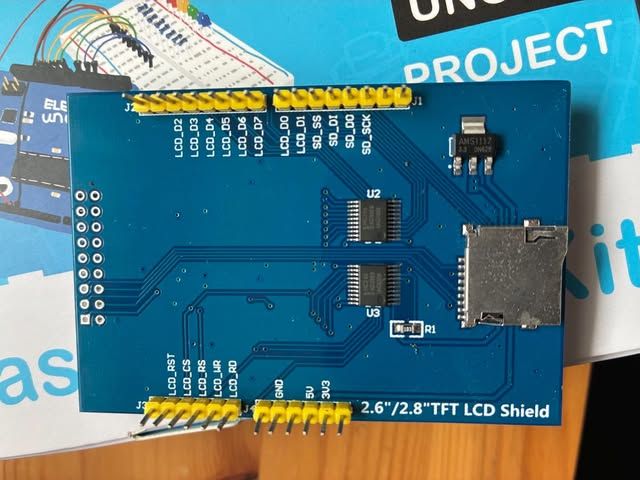
I photographed the back of the shield: the silkscreen reads 2.6"/2.8" TFT LCD Shield
Claude read the labels. The pins LCD_D0 to LCD_D7 and LCD_RST, LCD_CS, LCD_RS, LCD_WR and LCD_RD mean that the display uses an 8-bit parallel bus. The two chips are level shifters, there is a 3.3 V regulator, and the microSD slot is wired to the SPI pins.
Claude could not tell which controller chip the screen uses from the photo. These shields usually have an ILI9341 or an ILI9325, and sometimes an ST7789 or an R61509. It proposed the MCUFRIEND_kbv library, which reads the controller ID at run time, and asked for permission to change my machine's setup.
PROMPT
1yes please
Beat 3: Installing the tools
arduino-cli was already installed. Claude installed the arduino:avr core and the MCUFRIEND_kbv and Adafruit GFX libraries, and then confirmed that the board showed up as arduino:avr:uno.
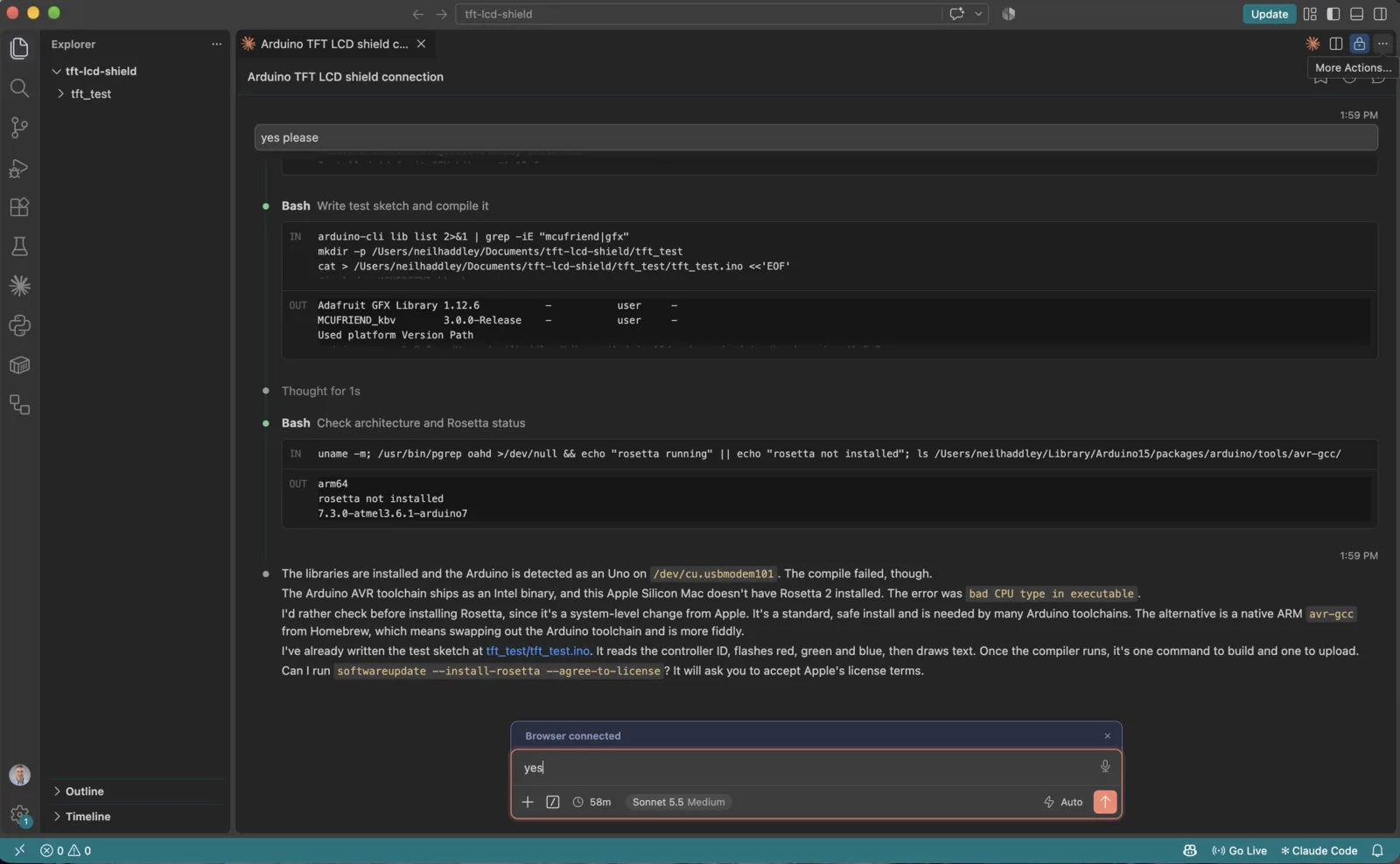
Claude installed the toolchain and wrote the test sketch in a new tft_test folder
The sketch reads the controller ID, prints it to the serial port, fills the screen with red, green and blue, and then draws text and a yellow border.
Beat 4: bad CPU type in executable
The first compile failed.
CODE
1fork/exec .../avr-gcc/.../bin/avr-g++: bad CPU type in executable
The Arduino AVR compiler is an Intel program, and my Mac has an Apple Silicon chip. Claude checked that Rosetta 2 was not installed, and it stopped to ask me before it ran a system-level install.
PROMPT
1yes
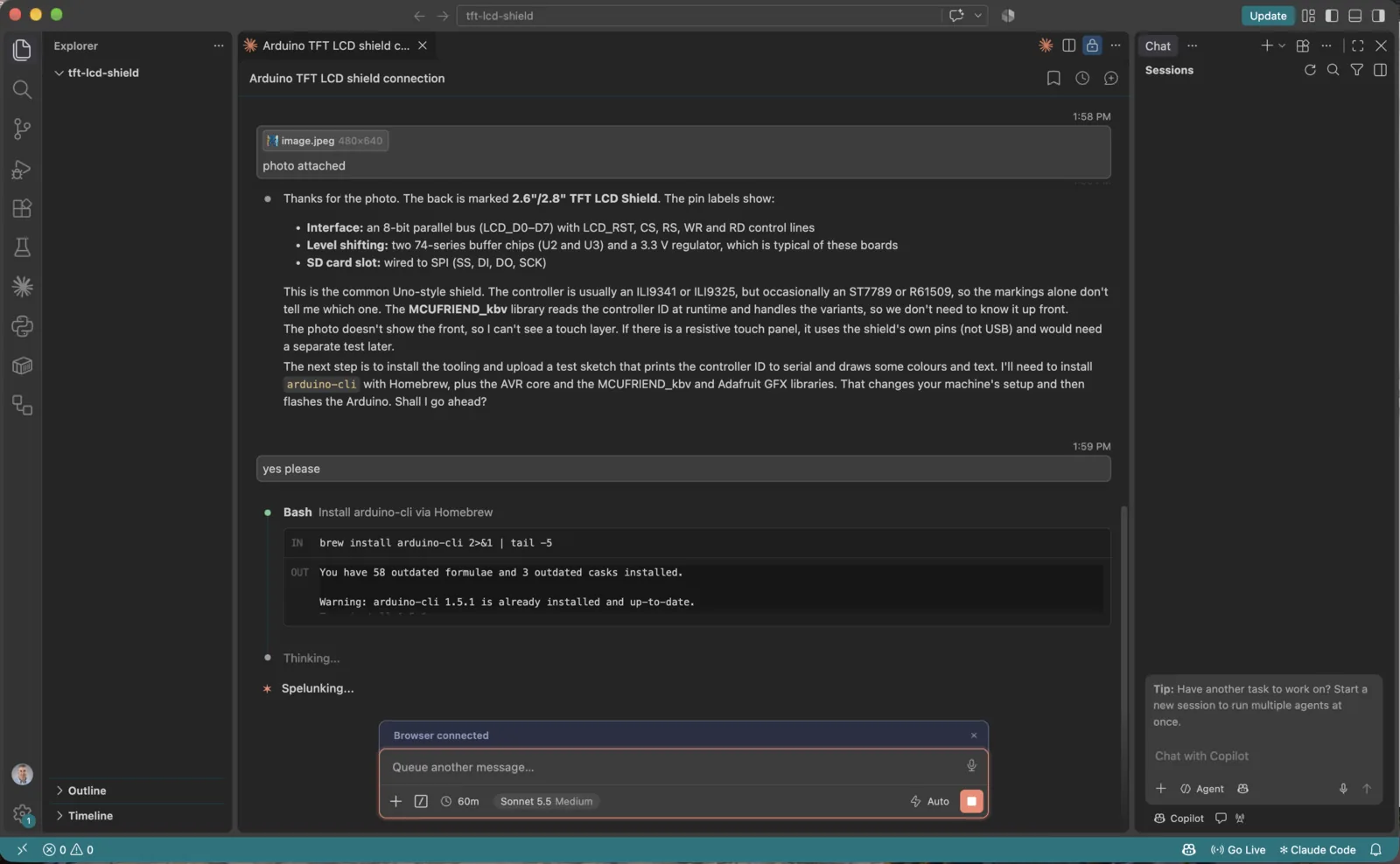
I answered yes in the composer, and Claude ran softwareupdate --install-rosetta --agree-to-license
Beat 5: The result
After Rosetta was installed, Claude compiled the sketch (49% of program storage), uploaded it, and read the serial port:
CODE
1Controller ID: 0x9341
2Size: 320x240
The shield has an ILI9341 controller, and the screen is 320 by 240 pixels in landscape. The display flashed red, green and blue, and then showed the text and the border. It worked.
What I learned
Beat 6: Making the screen a Claude Code status light
With the shield working, I wanted it to do something useful. I asked Claude Code to turn it into a physical status light for my Claude Code sessions.
PROMPT
1build the claude code status light
Claude wrote three files in ~/Documents/tft-lcd-shield/claude_status/:
claude_status.ino, a sketch that reads one line per update over USB serial (STATE|tool|count) and paints the whole screen in the colour of that state. It redraws only the parts that changed, so the screen does not flicker.claude_status_hook.py, a Claude Code hook script. Claude Code runs it for each event and passes the event as JSON on standard input. The script turns the event into a state line and passes it on. I changed how it passes the line on after my first test (see below).claude_status_daemon.py, a small background process that opens the Uno's serial port once and keeps it open. It writes to the port every line that the hook script sends it through a local socket.
| Claude Code event | Screen |
|---|---|
UserPromptSubmit | Amber THINKING, tool count back to 0 |
PreToolUse | Blue WORKING, with the tool name and the running tool count |
PostToolUse | Back to amber THINKING |
Notification | Red NEEDS YOU (Claude is waiting for permission or input) |
Stop | Green DONE, with the elapsed time frozen |
The sketch compiled to 53% of program storage and 27% of RAM. That left about 1,476 bytes free, so I kept the screen to text and flat colour blocks and drew no bitmaps.
The fix was to stop reopening the port. The daemon opens it once and waits 2.5 seconds for the board to finish restarting. After that, the hook only sends a message to the daemon, and the board is never reset again. If the daemon is not running, the hook starts it, so there is nothing to launch by hand.
I sent THINKING, then WORKING with the tool name Bash, then DONE. The screen ended on DONE with a green background, so the daemon fixed the reset.
The script exits quietly when the board is unplugged, so a missing Uno never blocks Claude Code.
To connect it to Claude Code, I added an entry for each of the five events to the hooks section of this project's .claude/settings.local.json. Hooks run on every event and change how Claude Code behaves, so I chose the local file rather than my user settings. The light now works only in sessions that start in this repository, and Git ignores the file, so it is never committed.
The hooks section of that file looks like this. The five entries are identical except for the event name, and command is the path to the hook script on my Mac, so a reader needs to change it to the path on their own machine. My file also holds some unrelated permission settings, which I left out.
JSON
1{
2  "hooks": {
3    "UserPromptSubmit": [
4      {
5        "hooks": [
6          {
7            "type": "command",
8            "command": "/Users/neilhaddley/Documents/tft-lcd-shield/claude_status/claude_status_hook.py"
9          }
10        ]
11      }
12    ],
13    "PreToolUse": [
14      {
15        "hooks": [
16          {
17            "type": "command",
18            "command": "/Users/neilhaddley/Documents/tft-lcd-shield/claude_status/claude_status_hook.py"
19          }
20        ]
21      }
22    ],
23    "PostToolUse": [
24      {
25        "hooks": [
26          {
27            "type": "command",
28            "command": "/Users/neilhaddley/Documents/tft-lcd-shield/claude_status/claude_status_hook.py"
29          }
30        ]
31      }
32    ],
33    "Notification": [
34      {
35        "hooks": [
36          {
37            "type": "command",
38            "command": "/Users/neilhaddley/Documents/tft-lcd-shield/claude_status/claude_status_hook.py"
39          }
40        ]
41      }
42    ],
43    "Stop": [
44      {
45        "hooks": [
46          {
47            "type": "command",
48            "command": "/Users/neilhaddley/Documents/tft-lcd-shield/claude_status/claude_status_hook.py"
49          }
50        ]
51      }
52    ]
53  }
54}
I filmed the shield while Claude Code worked: amber THINKING, the last tool (Bash), the tool count and the running timer
Three limits: several sessions at once share the one screen, the daemon holds the port so I have to stop it (pkill -f claude_status_daemon.py) before I upload a new sketch, and the Arduino IDE cannot use the port while the daemon is running.
The full source of the three files is below, exactly as it ran for the photo and the video.
Under the hood: claude_status_hook.py
PYTHON
1#!/usr/bin/env python3
2"""Claude Code hook: read the hook JSON on stdin and send STATE|tool|count to the Uno."""
3import json, os, socket, subprocess, sys, time
4
5PORT = os.environ.get("CLAUDE_STATUS_PORT", "/dev/cu.usbmodem101")
6COUNT = "/tmp/claude_status_count"
7
8try:
9    event = json.load(sys.stdin)
10except Exception:
11    event = {}
12name = event.get("hook_event_name", "")
13tool = event.get("tool_name", "")
14
15def read_count():
16    try:
17        return int(open(COUNT).read())
18    except Exception:
19        return 0
20
21if name == "UserPromptSubmit":
22    state, tool, count = "THINK", "", 0
23elif name == "PreToolUse":
24    state, count = "WORK", read_count() + 1
25elif name == "PostToolUse":
26    state, count = "THINK", read_count()
27elif name == "Notification":
28    state, tool, count = "ASK", "waiting for you", read_count()
29elif name == "Stop":
30    state, tool, count = "DONE", "", read_count()
31else:
32    state, tool, count = "READY", "", 0
33
34if name in ("UserPromptSubmit", "PreToolUse"):
35    open(COUNT, "w").write(str(count))
36if state == "READY":
37    open(COUNT, "w").write("0")
38
39if not os.path.exists(PORT):
40    sys.exit(0)  # board unplugged: do nothing, never block Claude Code
41
42SOCK = "/tmp/claude_status.sock"
43DAEMON = os.path.join(os.path.dirname(os.path.abspath(__file__)), "claude_status_daemon.py")
44msg = f"{state}|{tool[:15]}|{count}\n".encode()
45
46def send():
47    c = socket.socket(socket.AF_UNIX, socket.SOCK_DGRAM)
48    c.setblocking(False)
49    c.sendto(msg, SOCK)
50
51try:
52    send()
53except OSError:
54    # No daemon yet: start it detached (it holds the port open), then retry briefly.
55    subprocess.Popen([sys.executable, DAEMON], start_new_session=True,
56                     stdin=subprocess.DEVNULL, stdout=subprocess.DEVNULL, stderr=subprocess.DEVNULL)
57    for _ in range(20):
58        time.sleep(0.1)
59        try:
60            send()
61            break
62        except OSError:
63            pass
Under the hood: claude_status_daemon.py
PYTHON
1#!/usr/bin/env python3
2"""Holds the Uno's serial port open so hooks never reopen it (opening resets an Uno).
3Listens for datagrams on a Unix socket and writes each one to the port."""
4import os, socket, sys, termios, time
5
6PORT = os.environ.get("CLAUDE_STATUS_PORT", "/dev/cu.usbmodem101")
7SOCK = "/tmp/claude_status.sock"
8
9if os.path.exists(SOCK):
10    os.unlink(SOCK)
11s = socket.socket(socket.AF_UNIX, socket.SOCK_DGRAM)
12s.bind(SOCK)  # bound first, so messages sent while the board boots are queued
13
14fd = os.open(PORT, os.O_RDWR | os.O_NOCTTY)
15a = termios.tcgetattr(fd)
16a[0] = 0; a[1] = 0; a[3] = 0                      # raw: no input/output processing
17a[2] = (a[2] & ~(termios.CSIZE | termios.PARENB | termios.HUPCL)) | termios.CS8 | termios.CLOCAL | termios.CREAD
18a[4] = a[5] = termios.B115200
19termios.tcsetattr(fd, termios.TCSANOW, a)
20time.sleep(2.5)                                    # the open reset the board once; let it boot
21
22while True:
23    data = s.recv(256)
24    try:
25        os.write(fd, data)
26        termios.tcdrain(fd)
27    except OSError:
28        sys.exit(0)                                # board unplugged
Under the hood: claude_status.ino
CPP
1// Claude Code status light for an Uno + 2.8" ILI9341 TFT shield (MCUFRIEND_kbv).
2// Input over USB serial, 115200 baud, one line per update:  STATE|tool|count
3// STATE is READY, THINK, WORK, ASK or DONE.
4#include <MCUFRIEND_kbv.h>
5#include <Adafruit_GFX.h>
6
7MCUFRIEND_kbv tft;
8
9#define BLACK 0x0000
10#define WHITE 0xFFFF
11
12struct Look { const char *name; uint16_t colour; };
13const Look LOOKS[] = {
14  {"READY",    0x4A69},  // grey
15  {"THINKING", 0xFE00},  // amber
16  {"WORKING",  0x041F},  // blue
17  {"NEEDS YOU",0xF800},  // red
18  {"DONE",     0x07E0},  // green
19};
20
21char line[40];
22byte len = 0;
23byte state = 0, shown = 255;
24char tool[16] = "";
25char shownTool[16] = "x";
26int count = 0, shownCount = -1;
27unsigned long started = 0, frozen = 0;
28bool running = false;
29long shownSecs = -1;
30
31byte lookup(const char *s) {
32  if (!strcmp(s, "THINK")) return 1;
33  if (!strcmp(s, "WORK")) return 2;
34  if (!strcmp(s, "ASK")) return 3;
35  if (!strcmp(s, "DONE")) return 4;
36  return 0;
37}
38
39void parse() {
40  char *a = strtok(line, "|");
41  char *b = strtok(NULL, "|");
42  char *c = strtok(NULL, "|");
43  if (!a) return;
44  state = lookup(a);
45  strncpy(tool, b ? b : "", sizeof(tool) - 1);
46  tool[sizeof(tool) - 1] = 0;
47  count = c ? atoi(c) : 0;
48  if (state == 1 && count == 0) { started = millis(); }
49  running = (state == 1 || state == 2 || state == 3);
50  if (!running && state != 0) frozen = millis() - started;
51}
52
53void drawAll() {
54  tft.fillScreen(LOOKS[state].colour);
55  tft.setTextColor(state == 1 ? BLACK : WHITE);
56  tft.setTextSize(5);
57  int w = strlen(LOOKS[state].name) * 30;
58  tft.setCursor((320 - w) / 2, 40);
59  tft.print(LOOKS[state].name);
60  shown = state;
61  shownTool[0] = 'x'; shownTool[1] = 0; shownCount = -1; shownSecs = -1;
62}
63
64void drawDetails() {
65  uint16_t fg = state == 1 ? BLACK : WHITE;
66  if (strcmp(tool, shownTool) || shownCount != count) {
67    tft.fillRect(0, 110, 320, 60, LOOKS[state].colour);
68    tft.setTextColor(fg);
69    tft.setTextSize(3);
70    tft.setCursor(10, 115);
71    tft.print(tool);
72    tft.setTextSize(2);
73    tft.setCursor(10, 150);
74    tft.print(count);
75    tft.print(F(" tools used"));
76    strcpy(shownTool, tool);
77    shownCount = count;
78  }
79  long secs = (running ? millis() - started : frozen) / 1000;
80  if (secs != shownSecs) {
81    tft.fillRect(0, 190, 320, 40, LOOKS[state].colour);
82    tft.setTextColor(fg);
83    tft.setTextSize(3);
84    tft.setCursor(10, 195);
85    tft.print(secs / 60); tft.print(F("m "));
86    tft.print(secs % 60); tft.print(F("s"));
87    shownSecs = secs;
88  }
89}
90
91void setup() {
92  Serial.begin(115200);
93  tft.begin(tft.readID());
94  tft.setRotation(1);
95  drawAll();
96  Serial.println(F("ready"));
97}
98
99void loop() {
100  while (Serial.available()) {
101    char ch = Serial.read();
102    if (ch == '\n') { line[len] = 0; len = 0; parse(); }
103    else if (ch != '\r' && len < sizeof(line) - 1) line[len++] = ch;
104  }
105  if (state != shown) drawAll();
106  drawDetails();
107}
Beat 7: A 3D printed case
A bare Uno with a shield on top is fragile and easy to short against a desk. I wanted a case to hold it next to my laptop, so I asked Claude Code to design one.
PROMPT
1I need a box (enclosure) that I can 3d print for the uno+tft lcd shield with cutout for screen and for uno's usb input connector
Claude checked that OpenSCAD was installed and wrote a parametric model, uno_tft_case.scad, in ~/Documents/tft-lcd-shield/enclosure/. It then rendered the two parts as STL files that open in Bambu Studio.
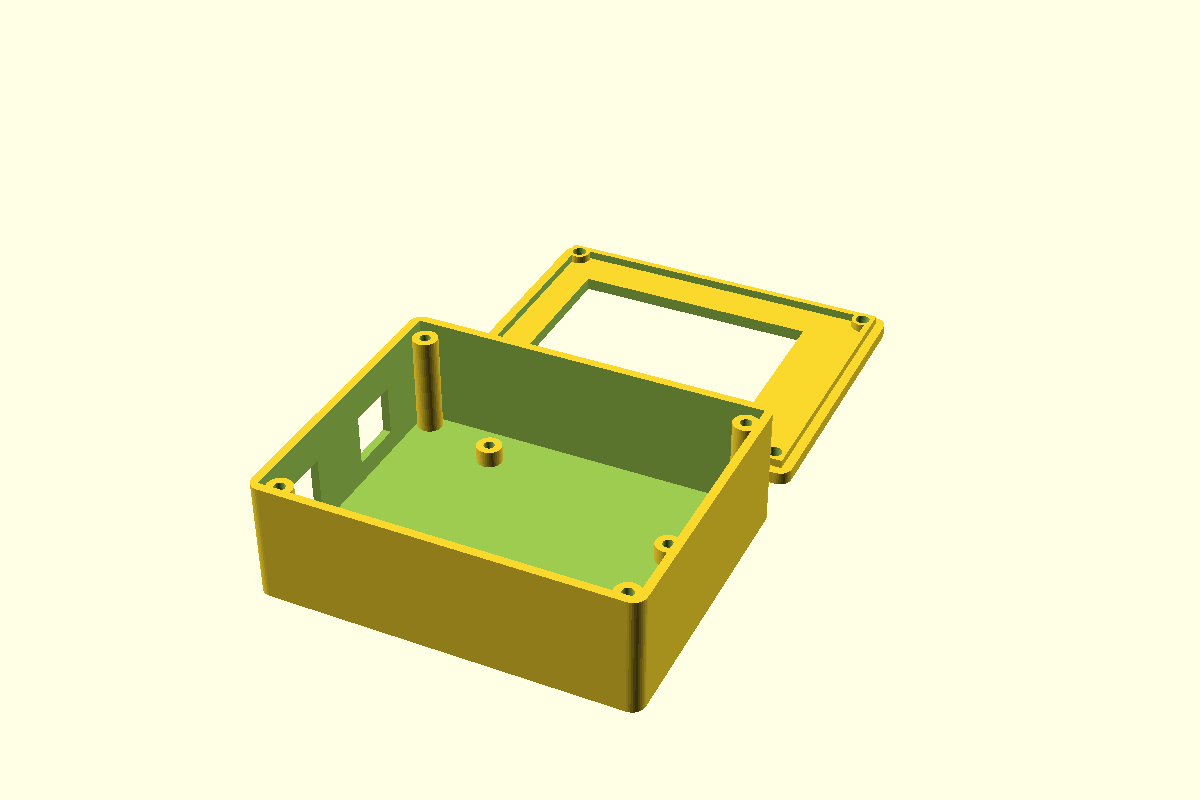
The preview that Claude rendered: the base on the left, and the lid with its screen window behind it
- Base. Four standoffs hold the Uno 4 mm off the floor, so the solder points under the board do not touch it. Each standoff has a pilot hole, so an M3 self-tapping screw through one of the Uno's mounting holes holds the board down. The left wall has an opening for the USB-B jack, and a second opening for the DC jack that I can switch off.
- Lid. A frame with a 59 by 44 mm window, a little larger than the 57.6 by 43.2 mm active area of a 2.8 inch screen. It prints face down with no supports, and a ring-shaped lip centres it on the base.
- Fixing. Four M3 self-tapping screws go into bosses in the corners. The case is about 88 by 71 mm outside, because the bosses need room beside the shield. The bosses stop 2 mm below the rim, so the lid lip sits on top of them.
Beat 8: The first print did not fit
The fit-test showed two problems. The shield overhangs the end of the Uno, so the case was a little too short. I removed one end wall to make room, and the photo below shows it.
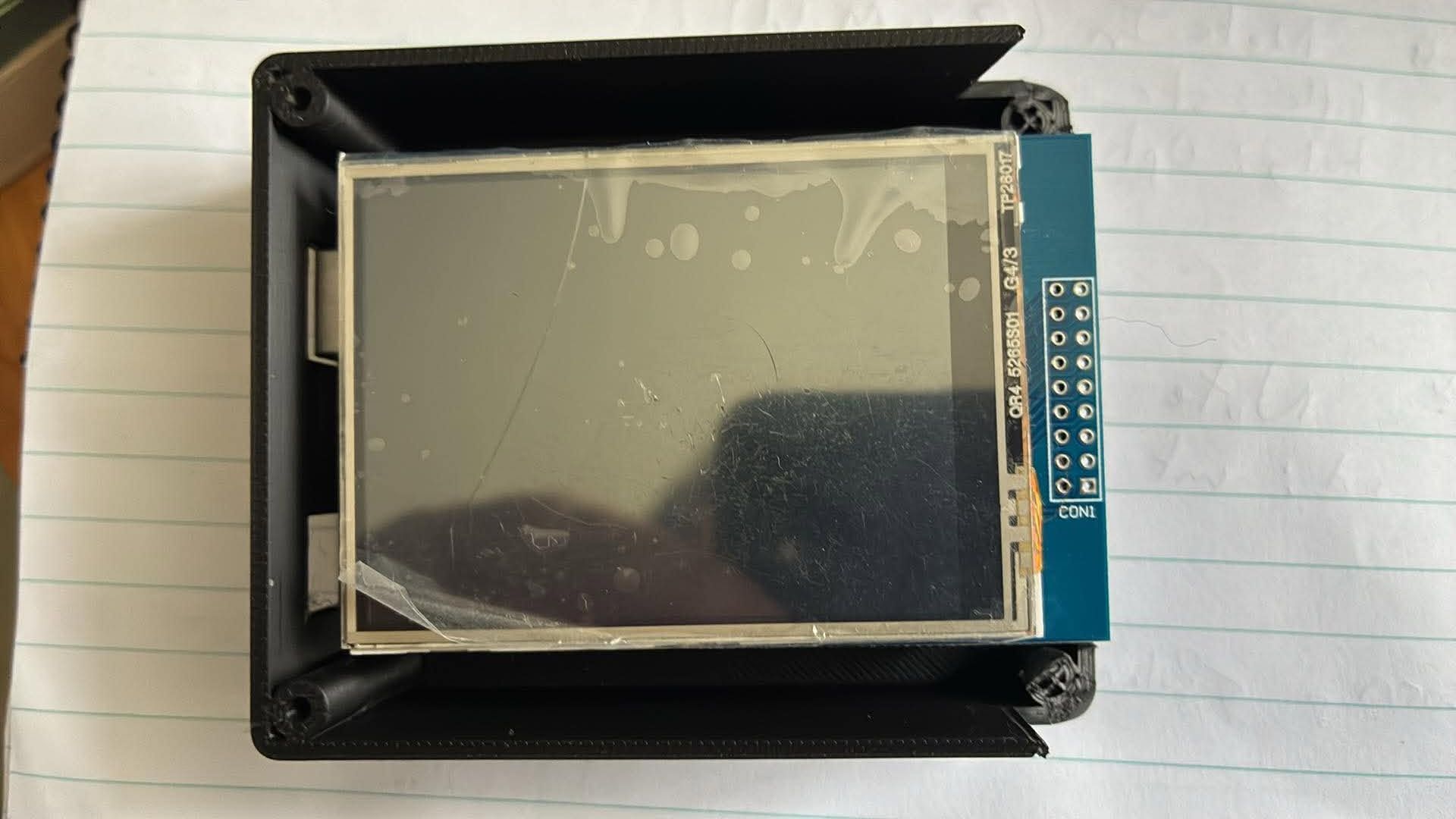
The shield sticks out past the end of the case where I removed the wall
The second problem was the lid. The corner bosses ran all the way to the top of the walls, so the lid lip had nowhere to go.
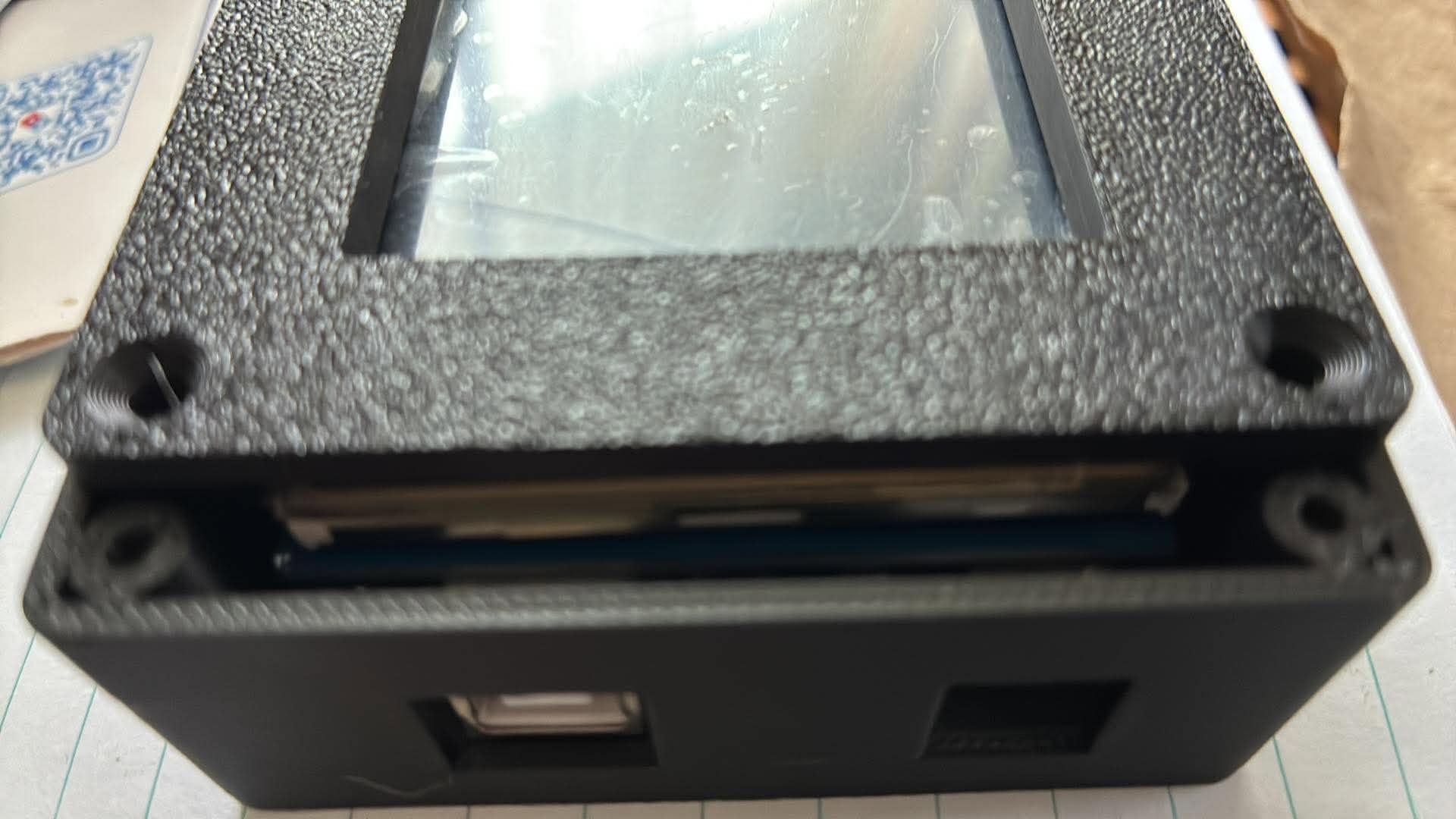
The lid sits on the bosses instead of dropping into the case
The Uno also had nothing holding it down, because the pins only located it.
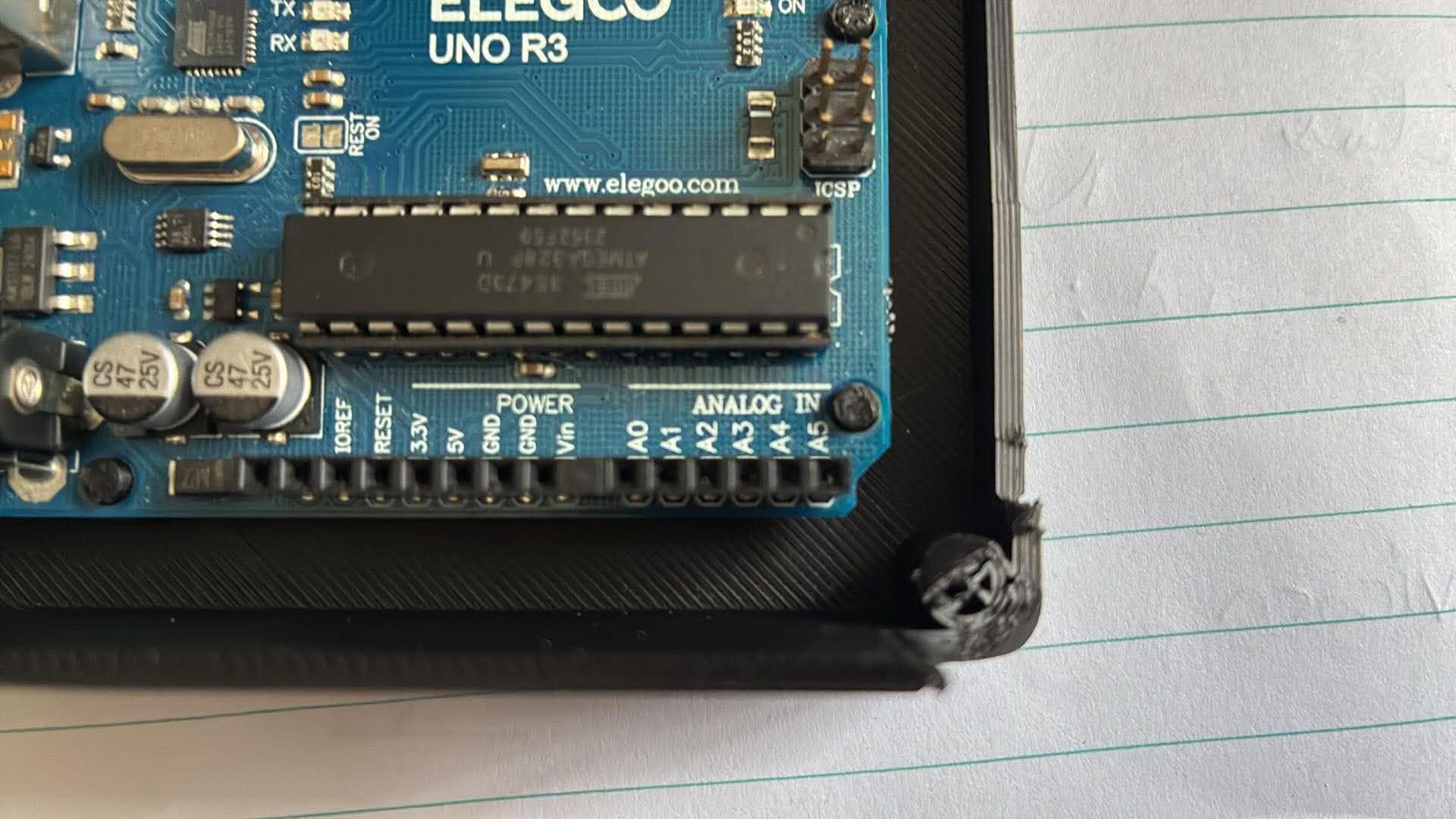
The Uno resting in the case, with nothing to fix it in place
I described all three problems to Claude Code, and it changed the model:
- Longer case. A new
ext = 2setting adds 2 mm to the end where I removed the wall. The Uno and the jack openings stay where they were. The window is centred on the longer lid, so it was a little off. Once the lid was on, I asked Claude Code to move the window 5 mm towards the USB wall, then 2 mm back again (win_dx = -3). - Lower bosses. The corner bosses stop 2.1 mm below the rim.
- Ring lip. The lid lip is now a ring with a pad at each corner, so it clears the touch glass and rests on the bosses.
- Screw posts. The Uno standoffs now take M3 self-tapping screws instead of pins.
I downloaded the files below. The STL files open in Bambu Studio, and the source is the OpenSCAD model.
| Part | File |
|---|---|
| Base | uno_tft_case_base.stl |
| Lid | uno_tft_case_lid.stl |
| Bambu Studio project | uno_tft_case_base.3mf |
| Source | uno_tft_case.scad |
Beat 9: Final assembly
I printed the new base and lid and put everything together. First I screwed the Uno onto its four posts. The USB-B and DC jacks line up with their openings in the wall.
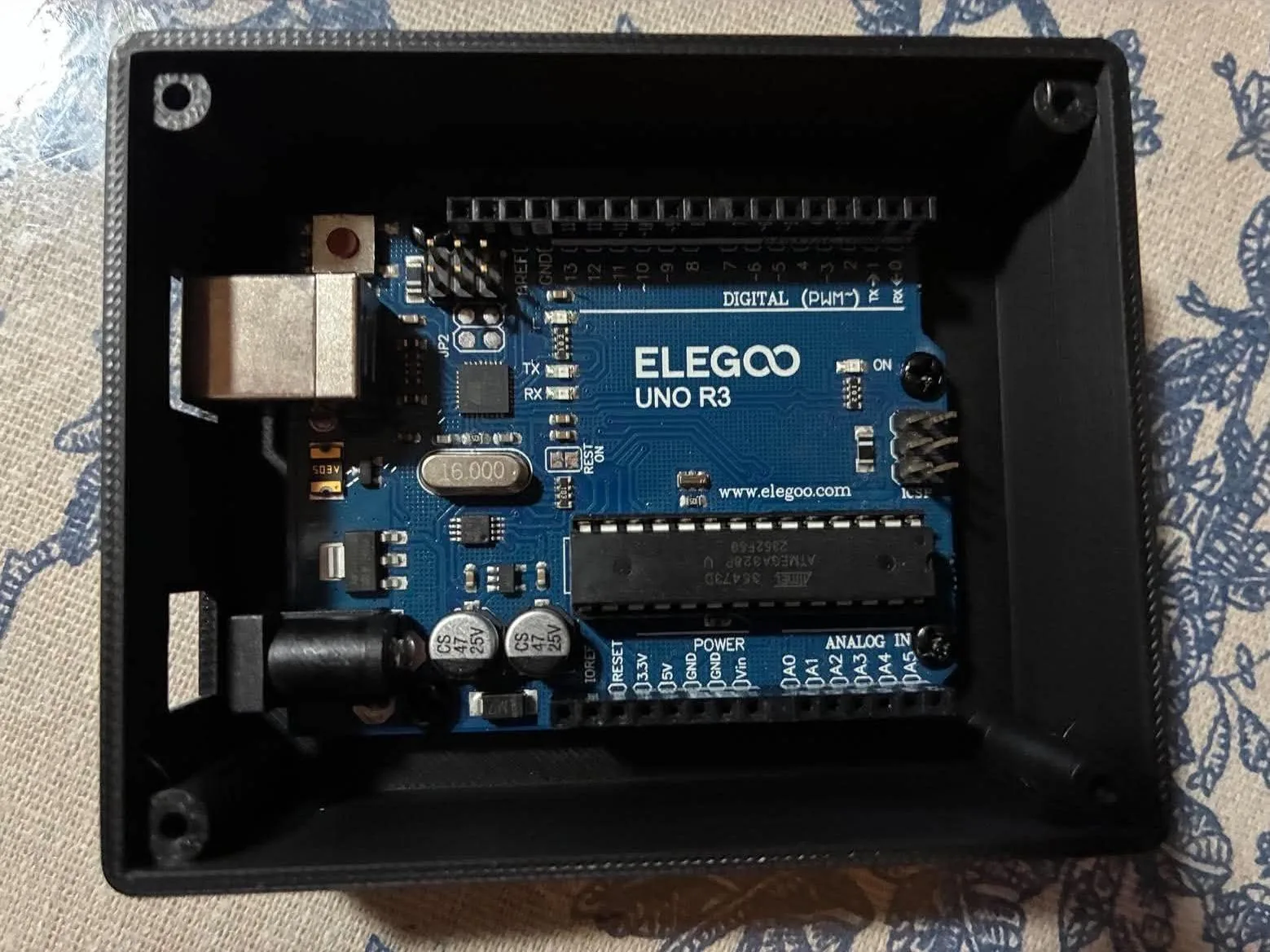
I screwed the Uno onto the four posts, with the jacks in their openings
Next I pressed the shield onto the Uno. The shield sits above the screw heads and still clears the corner bosses.
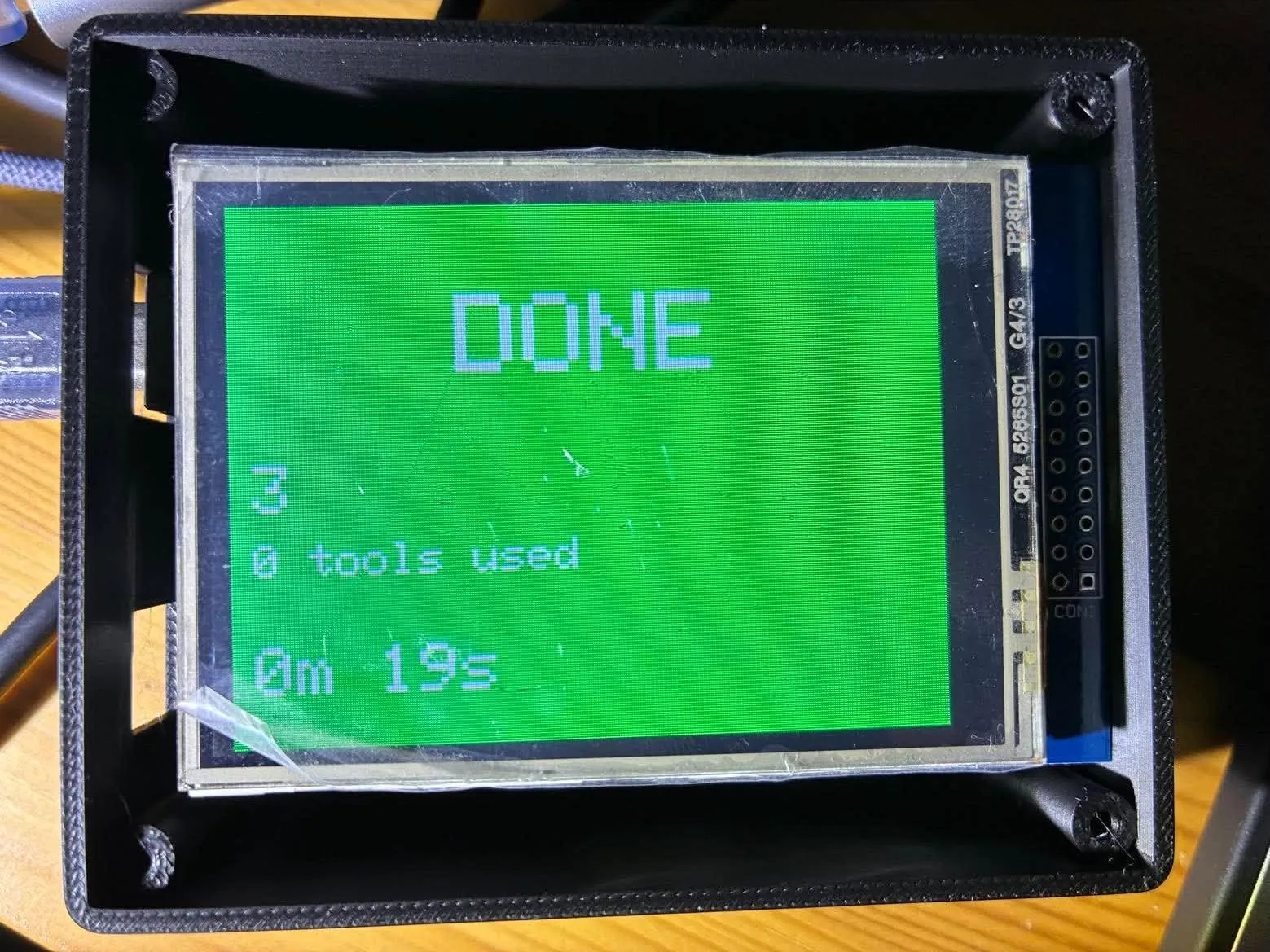
I fitted the shield, and the status light was already running
Finally I screwed the lid onto the corner bosses. The lip sits on top of them, and the window is over the screen.
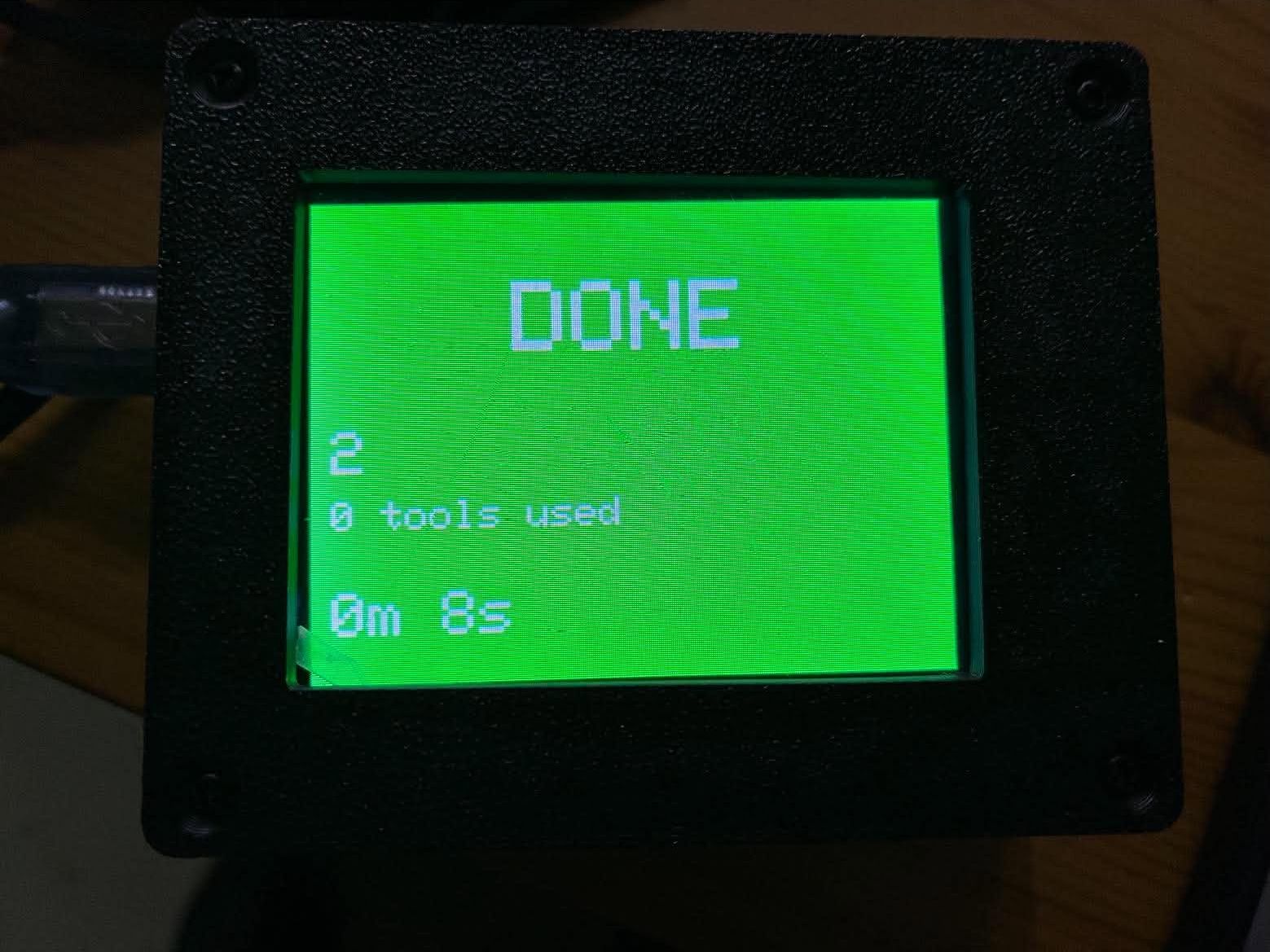
I fitted the lid, and the green DONE screen shows through the window
Under the hood: uno_tft_case.scad
CODE
1// Two-part 3D-printable case for an Arduino Uno R3 with a 2.8" TFT shield.
2// part = "base", "lid" or "both" (side by side, for a preview).
3// All sizes are millimetres. Check the three "measure" values against your own stack.
4part = "both";
5
6// --- Arduino Uno R3 (published board outline) ---
7uno_l = 68.6;  uno_w = 53.3;
8uno_holes = [[13.97, 2.54], [15.24, 50.8], [66.04, 7.62], [66.04, 35.56]];
9usb_y   = 38.1;           // centre of the USB-B jack, from the board's lower edge (measure)
10usb_w   = 13;  usb_h = 12;     // opening: jack is about 12 x 11, plus slack
11dc_y    = 9.5;            // centre of the DC barrel jack (measure)
12dc_w    = 10.5; dc_h = 12;
13dc_cutout = true;         // set false if you will not use the DC jack
14
15// --- 2.8" TFT shield and its screen (measure) ---
16shield_l = 71; shield_w = 56;      // widest outline of shield + touch glass
17stack_above = 20;                  // board top to top of touch glass (headers + shield + glass)
18win_l = 59;  win_w = 44;           // window in the lid, a little larger than the 57.6 x 43.2 active area
19win_dx = -3;  win_dy = 0;          // shift the window from the centre (negative = towards the USB wall)
20ext = 2;                           // extra length added to the far (+x) end, away from the USB jack
21
22// --- case ---
23wall = 2;  floor_t = 2;  lid_t = 3;
24standoff_h = 4;           // keeps the solder points under the Uno off the floor
25post_d = 6;               // Uno screw posts: M3 self-tapping screws go through the Uno's 3.2 mm holes
26lip_h = 2;  lip_w = 1.6;  // lid lip that centres the lid in the base
27margin = 5.5;             // space each side so the corner screw bosses clear the shield
28boss_r = 3;  screw_d = 2.6; screw_through = 3.4;
29gap = 0.3;                // lid-to-base fit
30
31cav_l = max(uno_l, shield_l) + 2 * margin + ext;
32cav_w = max(uno_w, shield_w) + 2 * margin;
33out_l = cav_l + 2 * wall;  out_w = cav_w + 2 * wall;
34bx = (cav_l - ext - uno_l) / 2;  by = (cav_w - uno_w) / 2;   // Uno origin inside the cavity
35board_top = floor_t + standoff_h + 1.6;
36glass_top = board_top + stack_above;
37base_h = glass_top + 0.5;                              // wall height; the lid sits on top
38boss_h = base_h - lip_h - 0.1;                         // corner bosses leave room for the lid lip
39$fn = 40;
40
41module rrect(l, w, h, r = 3) {
42  hull() for (x = [r, l - r], y = [r, w - r]) translate([x, y, 0]) cylinder(r = r, h = h);
43}
44module boss_positions() {
45  for (x = [boss_r, cav_l - boss_r], y = [boss_r, cav_w - boss_r]) translate([wall + x, wall + y, 0]) children();
46}
47
48module base() {
49  difference() {
50    union() {
51      difference() {
52        rrect(out_l, out_w, base_h);
53        translate([wall, wall, floor_t]) cube([cav_l, cav_w, base_h]);
54      }
55      boss_positions() cylinder(r = boss_r, h = boss_h);   // stops below the top so the lid lip fits
56      for (h = uno_holes) translate([wall + bx + h[0], wall + by + h[1], floor_t])
57        cylinder(d = post_d, h = standoff_h);
58    }
59    // pilot holes in the Uno posts for M3 self-tapping screws
60    for (h = uno_holes) translate([wall + bx + h[0], wall + by + h[1], floor_t + standoff_h - 8])
61      cylinder(d = screw_d, h = 9);
62    boss_positions() translate([0, 0, base_h - 12]) cylinder(d = screw_d, h = 13);
63    // USB-B opening in the left wall
64    translate([-1, wall + by + usb_y - usb_w / 2, board_top - 0.5]) cube([wall + 2, usb_w, usb_h]);
65    if (dc_cutout)
66      translate([-1, wall + by + dc_y - dc_w / 2, board_top - 0.5]) cube([wall + 2, dc_w, dc_h]);
67  }
68}
69
70module lid() {
71  difference() {
72    union() {
73      rrect(out_l, out_w, lid_t);
74      // lip that centres the lid in the base: a ring, so it clears the touch glass,
75      // with a pad at each corner that sits on top of a boss
76      translate([0, 0, -lip_h]) difference() {
77        translate([wall + gap, wall + gap, 0]) cube([cav_l - 2 * gap, cav_w - 2 * gap, lip_h]);
78        translate([wall + gap + lip_w, wall + gap + lip_w, -1])
79          cube([cav_l - 2 * gap - 2 * lip_w, cav_w - 2 * gap - 2 * lip_w, lip_h + 2]);
80      }
81      boss_positions() translate([0, 0, -lip_h]) cylinder(r = boss_r - gap, h = lip_h);
82    }
83    // screen window
84    translate([out_l / 2 + win_dx - win_l / 2, out_w / 2 + win_dy - win_w / 2, -3]) cube([win_l, win_w, lid_t + 4]);
85    // screw holes with countersinks
86    boss_positions() {
87      translate([0, 0, -3]) cylinder(d = screw_through, h = lid_t + 4);
88      translate([0, 0, lid_t - 1.7]) cylinder(d1 = screw_through, d2 = 6.4, h = 1.71);
89    }
90  }
91}
92
93if (part == "base") base();
94else if (part == "lid") translate([0, 0, lid_t]) mirror([0, 0, 1]) translate([0, 0, 0]) lid();  // printed screen-side down
95else { base(); translate([0, out_w + 10, 0]) translate([0, 0, lid_t]) mirror([0, 0, 1]) lid(); }
Next I want to try the resistive touch layer and the microSD slot.